Decking in MeisterCalc: inputs, results and screens
Published · Updated · By Sai Nath
The Decking calculator in MeisterCalc turns a deck's length and width, the board face and the gap into the total area, boards across, lineal metres and an order with 10% added. A 6000 × 4000 mm deck of 90 mm boards at a 5 mm gap is 24 m², 43 boards across and 258 m, so order 283.8 m.
Try it free on the web: Decking calculator, in your browser with nothing to install.
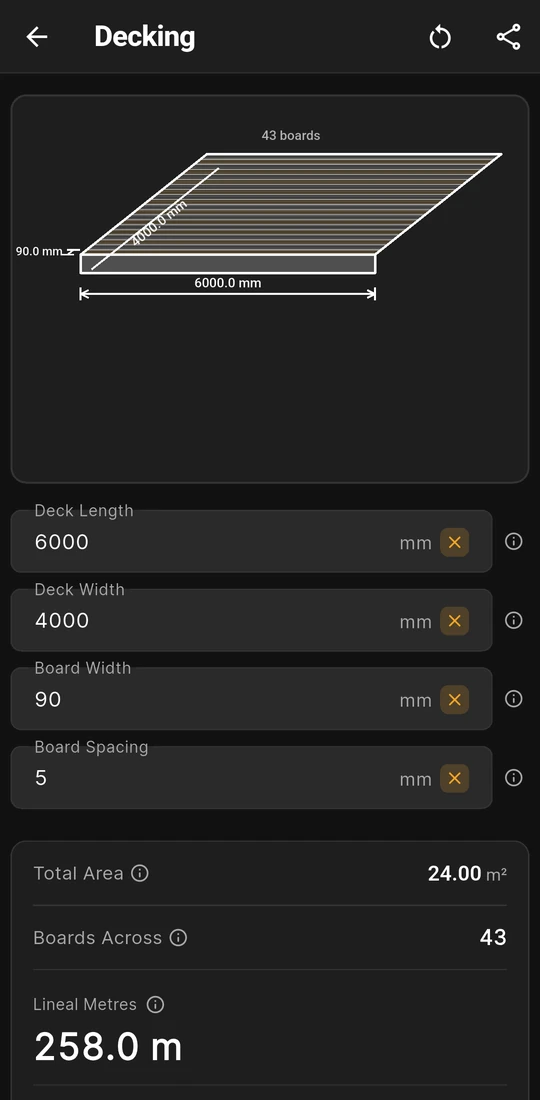
6000 × 4000 mm deck, 90 mm boards, 5 mm gap
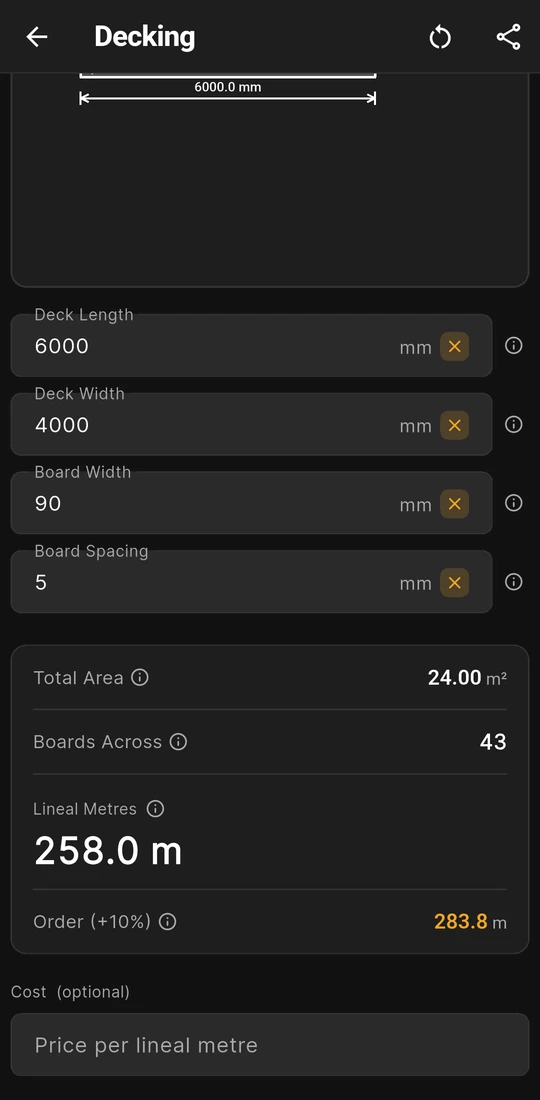
258.0 m of board, order 283.8 m
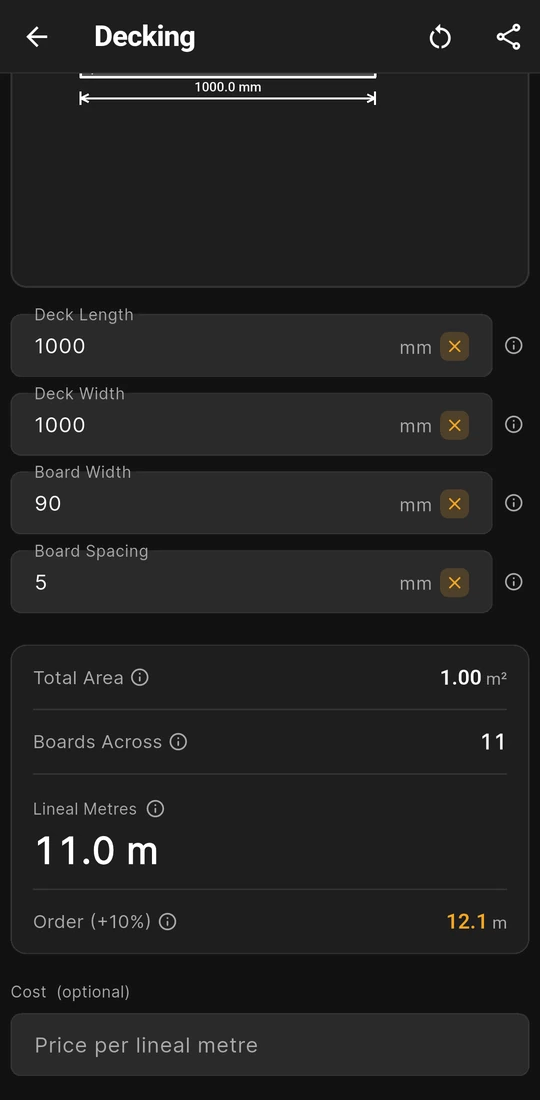
One square metre: 11 rows, 11.0 m of board


Every Decking field, in and out
Decking answers the ordering question for a deck: how much board to buy. Open Home ▸ Decking, enter four measurements, and the results and a drawing of the boards update as you type. Whether it is the right app for your job is a separate question, covered in is there a decking calculator app that works in lineal metres?
| Field | In or out | What it means |
|---|---|---|
| Deck Length | You enter | The way the boards run, outside edge to outside edge of the frame. Every row of boards spans it. |
| Deck Width | You enter | The other way, across the boards. It decides how many rows fit. |
| Board Width | You enter | The dressed face of one board, not its nominal size. It has to be less than the Deck Width. |
| Board Spacing | You enter | The gap between boards. It starts at 5 mm, and 0 is allowed for boards butted tight. |
| Total Area | Result | Length × width in square metres, to two decimals. |
| Boards Across | Result | Deck Width ÷ (Board Width + Board Spacing), rounded up to a whole row. |
| Lineal Metres | Result | Boards Across × Deck Length: the board to buy before waste, and the headline figure. |
| Order (+10%) | Result | Lineal Metres × 1.10, the amount to order. |
Under the results sits Cost (optional). Type a Price per lineal metre and two rows appear: Total Cost, Lineal Metres × price, and Cost + 10% Waste. A Wastage slider from 0 to 30%, in 1% steps, changes the percentage in that second row. It doesn't touch Order (+10%), which always adds 10%. The currency sign comes from Settings ▸ Units ▸ Currency symbol.
When the numbers can't work, a red note under the field says why, such as "Board width must be less than deck width". The last measurements, the price and the wastage are kept for next time.
Worked example: 90 mm boards on a 6000 × 4000 mm frame
These are the first two screens above: Deck Length 6000 mm, Deck Width 4000 mm, Board Width 90 mm and the starting Board Spacing of 5 mm.
- Total Area: 6 m × 4 m = 24 m², shown as 24.00 m².
- Boards Across: each row takes a board and a gap, 90 + 5 = 95 mm. 4000 ÷ 95 = 42.1, which rounds up to 43 rows.
- Lineal Metres: 43 rows of 6 m make 258 m, shown as 258.0 m.
- Order (+10%): 258 × 1.10 = 283.8 m.
Rounding up gives the last row a whole board even when only a strip is left. Here 42 rows reach within 15 mm of the edge, so the 43rd board would be ripped to about 10 mm, which is worth planning before the first board goes down: the last deck board is too narrow covers the fixes.
Small decks feel the rounding more. The third screen is one square metre, 1000 × 1000 mm, with the same boards and gap: 1000 ÷ 95 = 10.5 rounds up to 11 rows, so 11.0 m of board and 12.1 m to order, against the 10.53 m a straight division gives. The average per square metre is in lineal metres in a square metre of decking.
What you see on the screen
- A 3D drawing of the boards. The deck is drawn as a skewed stack of boards with the length, width, board width and gap marked and the board count written above it. It draws at most 20 boards, so on a wide deck the drawing is a sample and the label gives the real count.
- A note on every field. Each ⓘ button opens a short note and a fuller page with its own drawing. Board Spacing's note gives rule-of-thumb gaps, but your board maker's figure comes first. The Order (+10%) note suggests 15% for a deck with many angles or cut-outs, which you work out by hand.
- Feet and inches in, metres out. With Settings ▸ Units ▸ Default units ▸ Imperial (ft/in), the four inputs and the drawing switch to feet, inches and fractions, but Total Area stays in m², Lineal Metres and the order stay in metres, and the price is still per lineal metre. Changing units clears the fields.
- Share results. Share as Text or Share as PDF sends the four inputs and four results, plus the two cost rows once you've typed a price.
Do you need Pro for Decking?
Yes. Decking is one of the 13 Pro calculators; Concrete, Stairs and Check Square are the free ones. Without Pro you can open it, type your deck and watch the boards drawn, but the results are blurred until you unlock. Pro is a subscription or a one-time lifetime unlock; Google Play shows the plans and prices in your currency, so none are quoted here.
Deck board gaps and joists by country
Decking uses the gap you type and never looks at the joists under the boards. Both are set elsewhere. These are the figures the site has checked against a named source:
| Country | Figure | Where it comes from |
|---|---|---|
| Australia | Timber boards: a 2 to 5 mm gap when laid, by species, width and moisture, with 3 to 4 mm ideal over time | WoodSolutions TDG 21, Table 4: decking board gaps |
| Australia | Joists at 500 mm centres at most under 19 mm hardwood boards (Medium Feature or Standard grade), 400 mm under 19 mm Standard grade treated softwood | WoodSolutions TDG 21, Table 2: joist spacing in Australia |
| New Zealand | Joists at 450 mm centres at most under 19 mm timber boards, 600 mm under 32 mm | BRANZ, Slatted decking: joist spacing in New Zealand |
| United Kingdom | No deck joist spacing quoted; the TDCA points to its own span tables | Joist spacing in the UK |
Composite boards and hidden-fixing clips have their own gaps and joist centres in the maker's guide. The board maker, the NCC or your local code, and your council or building consent authority decide what applies; the app checks none of it. Once you know the joist spacing, Running Measurements gives the marks.
Rules in more detail: US deck rules (IRC R507), and the rest of building codes by country, from Australia's NCC to New Zealand's Building Code, England's Approved Documents and the US IRC.
Questions about Decking
Does Decking tell me how many boards to buy?
Not as a count of boards. Boards Across is the number of rows and Lineal Metres is the length of board in them, because stock lengths vary by supplier. If your boards are as long as the deck, buy Boards Across plus spares; otherwise divide the order by your stock length and round up.
Can I change the 10% on Order (+10%)?
Not on that row; it always adds 10%. The Wastage slider under Cost (optional) runs from 0 to 30%, but it changes only the cost. For a bigger allowance on the length, multiply Lineal Metres yourself.
Which measurement is the Deck Length?
The one the boards run along. Swap Length and Width and you describe a different deck: the rows are counted across the width and each one is as long as the length, so check which way the boards go on the plan before you type.
Does it do picture-frame borders, diagonal boards or joists?
No. It lays straight rows the full length of the deck. Add border and breaker boards yourself, and allow more for a diagonal layout. Joists are a separate job: Running Measurements marks them out and Stud Counter counts them.
Does it work for composite boards?
Yes, if you enter the board's face width and the gap its maker specifies. Hidden-fixing clips often set the gap themselves, so use the clip's figure as the Board Spacing.
Guides that go deeper
- Decking calculator app: boards across and lineal metres
- How many decking boards (lineal metres) do I need?
- How big should the gap between decking boards be?
- How many lineal metres of decking are in a square metre?
- The last deck board is too narrow: how do I avoid or fix it?
- How do I square a deck frame?
Get MeisterCalc
MeisterCalc runs on Android 7.0 or later and works every sum out on the phone, so Decking works with no signal at the timber yard. Concrete, Stairs and Check Square are free to try before you unlock Pro.