How do I use a dumpy level and staff on site?
Published · Updated · By Sai Nath
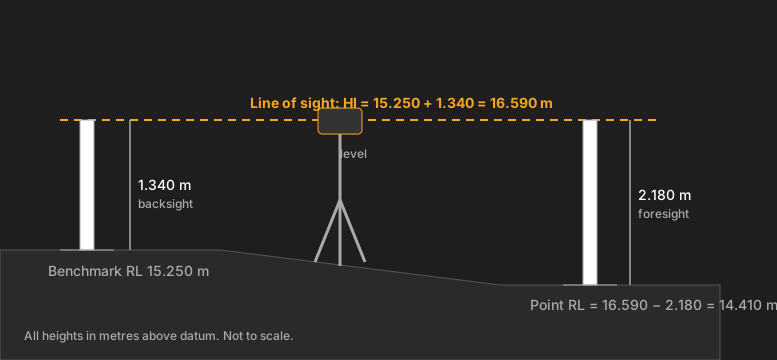
Set the level on a tripod and level it with the bubble. Hold the staff on a benchmark of known level and read it: that reading added to the benchmark's level is the height of the instrument (HI). Then read the staff at each point you want. Its level is HI minus that reading.
What do I need?
- An optical or automatic level (the “dumpy”) and a tripod. This page is about those, not rotating lasers.
- A levelling staff, and someone to hold it.
- A benchmark: a point whose level you already know. More on that below.
- A notebook, or the Dumpy Level calculator in MeisterCalc, to do the sums.
How to use a dumpy level, step by step
- Set up the tripod where you can see both the benchmark and the points you need. Close to halfway between them is best. Press the legs in firmly and get the head roughly level by eye.
- Mount the level and centre the bubble. Use the three levelling screws to bring the bull's-eye bubble to the middle. Turn the telescope through a full circle: the bubble should stay put. If it drifts, adjust the screws again. The Wikipedia article on levels describes the same idea: three levelling screws and a bull's-eye level to make the instrument's plane horizontal (checked on 28 October 2026).
- Focus. Focus the eyepiece until the crosshairs are sharp, then the telescope until the staff is sharp, so the staff and the crosshairs don't shift against each other when you move your eye.
- Backsight on the benchmark. The staff holder stands the staff upright on the benchmark. Read the staff at the middle horizontal crosshair. That is the backsight.
- Work out the height of instrument: HI = benchmark level + backsight. HI is the level of your line of sight. It stays the same until the instrument moves.
- Foresight each point. Staff on the next point, read the middle crosshair. Level = HI − foresight. A bigger reading means a lower point.
- Close the loop. Finish by sighting the benchmark again, or another point of known level. You should get the same figure as at the start. If not, there is a blunder somewhere in between. For example, with the same HI of 16.590 m, a closing reading of 1.340 m on the benchmark gives 16.590 − 1.340 = 15.250 m, the level you started with.
Keep the sight lengths short and, where you can, about the same on the backsight and the foresight. The Wikipedia article on levelling notes that this makes the errors from the earth's curvature and from refraction cancel. Checked on 28 October 2026.
Worked example in metres
The benchmark is 15.250 m. With the level set up, the staff reads 1.340 on the benchmark and 2.180 on the point you want.
- HI = 15.250 + 1.340 = 16.590 m.
- Level of the point = 16.590 − 2.180 = 14.410 m.
The point is 0.840 m below the benchmark: the staff read 0.840 more there than on the benchmark (2.180 − 1.340). Both ways agree, which is the quick check.
The same set-up can serve many points, as long as the level isn't moved. Here is a reading table for three of them:
| Point | Backsight (m) | Foresight (m) | HI (m) | Level (m) |
|---|---|---|---|---|
| Benchmark | 1.340 | 16.590 | 15.250 | |
| A | 2.180 | 14.410 | ||
| B | 0.960 | 15.630 | ||
| C | 3.020 | 13.570 |
Point B reads smaller than the benchmark, so it's higher: 0.380 m above it. The result has three decimal places because the staff is read to the millimetre. If you only need the fall between two points, see how to calculate fall, and for the sums behind a whole run of levels, how to calculate reduced level.
What is a benchmark in surveying?
A benchmark is any item used to mark a point as an elevation reference, according to the Wikipedia article on benchmarks (checked on 28 October 2026). On a house block it is often a survey mark, a peg or a spot on a kerb or slab that the surveyor has given a level to.
If there is no known level on the site, you can pick a fixed point and give it an assumed one, such as 100.000 m, and work from there. Every level is then relative to that point only. Don't mix assumed levels with levels from the drawings. In Australia, levels from a surveyor are usually quoted to the Australian Height Datum (AHD), the datum named in MeisterCalc's own help text. Ask the surveyor or check the plan for which datum a job uses.
How do I read the staff?
Read the number at the middle horizontal crosshair, to the millimetre. The staff has to be upright, and the right way up. How to read the markings is covered on its own page: how to read a dumpy level staff.
Can a dumpy level measure distance?
Yes, roughly. Most levels have two extra short crosshairs (stadia hairs). Distance is roughly a fixed multiple of the gap between the top and bottom hair readings on the staff; the multiple is set by the instrument, so check its manual. For example, if the instrument's multiple is 100 (check the manual), top and bottom hair readings of 1.420 and 1.320 are 0.100 m apart, so the staff is about 0.100 × 100 = 10 m away. It is a rough check, not a replacement for a tape. Levelling is about height, not distance.
What if the benchmark is on a ledge, not the ground?
The method doesn't change. Suppose the benchmark is a mark on a windowsill at 20.000 m. Stand the staff on that mark and read it as usual. With a reading of 1.200 m there, HI is 21.200 m. A staff reading of 1.750 m on the point below gives 21.200 − 1.750 = 19.450 m.
Checking your work
- Close on a known point. Sight the benchmark again at the end, or a second known level. The two readings should match.
- Keep the staff upright. A leaning staff reads long. Check the bubble on it if it has one.
- Read the middle hair, not the top or bottom stadia hair.
- Don't move the level between the backsight and the foresight. If you must move it, you need a change point: a fixed spot read from both set-ups, which carries the level across.
- Write each reading down as you take it, and say it back to the person on the staff.
Doing the sums in MeisterCalc
The Dumpy Level calculator does the HI and level sums for one point at a time. Open MeisterCalc, tap Dumpy Level on the home screen, and choose a mode at the top: Mode A — BM On Ground or Mode B — BM Not On Ground. Both use the same three boxes and the same formula, so the mode only changes the diagram.
- Enter the Benchmark RL: 15.250.
- Enter the Staff Reading at BM: 1.340.
- Enter the Staff Reading at Measure: 2.180.
- The Height of Instrument (HI) reads 16.590 m and the Measured RL reads 14.410 m.
- For another point, change only the Staff Reading at Measure. To send the numbers, tap the share icon and choose Share as Text or Share as PDF.
The Dumpy Level calculator works in metres whatever the unit setting. It takes negative numbers, for levels below datum.
What the app doesn't do
- It doesn't teach set-up, focusing or reading the staff. You need those skills, or someone who has them.
- It does one point at a time. It has no reading table, no intermediate sights, no rise and fall method and no closing check.
- It doesn't check your numbers. A mistyped reading gives a wrong level with no warning.
- It isn't a replacement for a surveyor. Levels for a permit, a boundary or a drainage fall come from the surveyor, the plans and the council, not from the app.
For the slope between two levels you've found, see slope of land.
Try it
Dumpy Level is one of the 12 MeisterCalc calculators that unlock with a weekly subscription that starts with a 3-day free trial, or with a one-time lifetime unlock; Google Play shows the prices in your currency. Concrete, Stairs and Check Square are free. It works offline, on Android 7.0 or later. There's no iPhone version yet; you can join the iOS waitlist.