Is there a free construction calculator app for Android?
Published · Updated · By Sai Nath
Yes. MeisterCalc is a construction calculator for Android, and three of its 15 calculators are free to use with no time limit: Concrete, Stairs and Check Square. The other 12 unlock with a weekly subscription that starts with a 3-day free trial, or with a one-time lifetime unlock. It is Android only, and calculations work offline.
Which calculators are free?
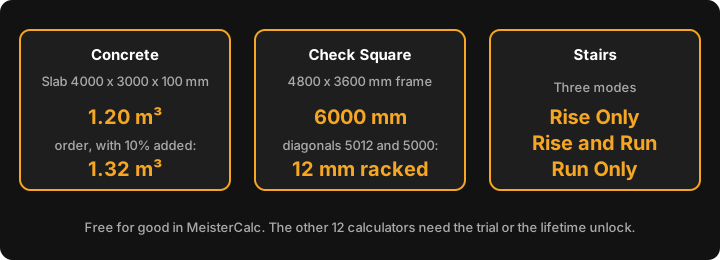
Concrete, Stairs and Check Square are the first three cards in the Home screen's default order, and they open without a trial or a purchase. Each has a live diagram that changes as you type.
- Concrete has two modes, Slab and Holes. A 4000 × 3000 × 100 mm slab is 4.0 × 3.0 × 0.1 = 1.20 m³ (1200 litres), and the order figure, with 10% added, is 1.20 × 1.10 = 1.32 m³. Six holes 300 mm across and 800 mm deep: one hole is π × 0.15² × 0.8 = 0.0565 m³, six are 0.3393 m³, and 0.3393 × 1.10 = 0.3732 m³ to order. More in the concrete calculator app guide and how much concrete do I need.
- Stairs has three modes: Rise Only, Rise and Run, and Run Only. You enter the measurements you know and it works out the number of risers, the rise and the stringer length. For example, in Rise Only mode a 2700 mm total rise with a 250 mm going targets a riser of (600 − 250) ÷ 2 = 175 mm: 2700 ÷ 175 = 15.4, so 15 risers of 2700 ÷ 15 = 180 mm. The method behind it is in how many steps for a floor height.
- Check Square has two modes. Target Diagonal gives the diagonal a square rectangle should have: 4800 × 3600 mm should measure √(4800² + 3600²) = √36 000 000 = 6000 mm corner to corner. Is It Square? takes your two tape readings: diagonals of 5012 and 5000 mm on a 4000 × 3000 mm frame are 5012 − 5000 = 12 mm apart, so the frame is racked. See how to check if a frame is square.
What costs money?
The other 12 calculators: Baluster Spacing, Pitch, Decking, Equal Spacings, Running Measurements, Raked Walls, Triangles, Dumpy Level, Gravel, Soil, Asphalt and Stud Counter. There are two ways in.
- Weekly subscription with a free 3-day trial. Nothing is charged during the trial, and you can cancel from Google Play ▸ Subscriptions before it ends.
- Lifetime unlock, a one-time payment.
Google Play shows the prices in your currency, so none are quoted here. A locked calculator is not a free preview: it shows no results until you unlock it. Your unlock is tied to your Google account. On a new phone, sign in with the same account and tap Restore Purchase on the paywall.
Is there a free construction calculator app for iPhone?
Not from MeisterCalc. There is no iPhone version yet, only an iOS waitlist.
What do you need to know before you download it?
- Android 7.0 or later. The interface is in English.
- Calculations work offline. Every calculation runs on the phone, so no signal is needed on site. The internet is used only for purchases, product analytics and crash reports.
- Metric first. Millimetres are the default. For feet, inches and sixteenths, go to Settings ▸ Units ▸ Default units ▸ Imperial (ft/in).
What is it not?
MeisterCalc does not do rafter, hip or valley cuts, birdsmouths, board feet or feet-and-inch arithmetic, and it has no roof area or stair landings. If you need those, or want to compare other apps, read best construction calculator apps for Android. If you would rather pay once than subscribe, see construction calculator apps with a one-time purchase. Building rules come from the NCC, the NZ Building Code or Approved Documents, and your local council, not from the app.
How does the free tier compare with other apps?
Free tiers differ a lot: some apps free one calculator, others give a time-limited trial of everything. Facts below are from each app's own listing or site, checked on 28 October 2026. Prices and trial lengths change, so check the listing before you pay.
| App | What is free | How the rest is sold (as listed) | Platforms |
|---|---|---|---|
| MeisterCalc | Concrete, Stairs, Check Square, no time limit | Weekly subscription with a 3-day free trial, or a one-time lifetime unlock | Android |
| Chippy Tools: Construction | Baluster Spacing; the other calculators are premium | Its site offers a 7-day trial with no card; the developer's reply on Google Play says Pro is a subscription or a one-time payment | Android, and iPhone per its site |
| Construction Master Pro Calc | A 14-day free trial | Renewing subscription after the trial | Android, and Apple devices |
| The Carpentry Calculator | Not stated on the listing | In-app purchase; the developer's reply (18 April 2025) says it is one time only, not a subscription | Android |
| The Chippy Calc: Builder Tools | Not stated on the listing | In-app purchases; the model (subscription or one-time) is not stated | Android (other platforms not checked) |
| BuildCalc | Nothing: a paid app | Google Play AU lists it at $34.99 | Android and iPhone/iPad |
Where the others are stronger: Construction Master Pro Calc does feet-inch-fraction maths and rafter, hip and valley keys, which MeisterCalc does not. The Chippy Calc lists rafters, and The Carpentry Calculator lists roofing. Chippy Tools has a bigger user base (50K+ downloads and 215 Google Play reviews against MeisterCalc's 100+ downloads and no ratings yet) and an iPhone version. MeisterCalc's case is narrower: three free calculators with live diagrams, metric first, an offline Android app, and a lifetime unlock as an alternative to the subscription. Free calculators also differ: Chippy Tools' free one is Baluster Spacing, where MeisterCalc's are Concrete, Stairs and Check Square. For the longer dated comparison see best construction calculator apps for Android.
The same apps for the two layout jobs people ask about most, decking and even spacing, as each listing describes them (checked on 28 October 2026):
| App | Decking | Even spacing, posts, studs or balusters |
|---|---|---|
| MeisterCalc | Decking: boards across, lineal metres, order with 10% added; no picture frames, fascia or screws | Equal Spacings, Running Measurements and Baluster Spacing, each with a live diagram |
| Chippy Tools: Construction | Premium calculator | Equal spacing and running measurements are premium; Baluster Spacing is the free one |
| The Chippy Calc: Builder Tools | Decking with picture-frame layouts, fascia and screws | Balustrade spacing and a linear cut list |
| The Carpentry Calculator | Listed among its functions | Balustrades; most functions draw the work and list running measurements |
| BuildCalc | Not mentioned on the listing we read | Baluster layout and a fence function |
| Construction Master Pro Calc | Not mentioned on the listing we read | Studs on-centre, with feet-inch-fraction entry |
If you need picture frames, fascia or screw counts for decking, The Chippy Calc lists them and MeisterCalc does not. For even spacing, Chippy Tools lists a like-for-like Equal Spacings calculator; we did not test how any other app rounds, so check an app against your own example before you pay.