Equal Spacings in MeisterCalc: inputs, results and screens
Published · Updated · By Sai Nath
Equal Spacings in MeisterCalc divides an overall length into equal spaces as close as possible to a target spacing, and gives the number of spaces, the actual spacing and the pieces needed, one more than the spaces. A 5500 mm run at a 450 mm target is 12 spaces of 458.3 mm and 13 pieces.
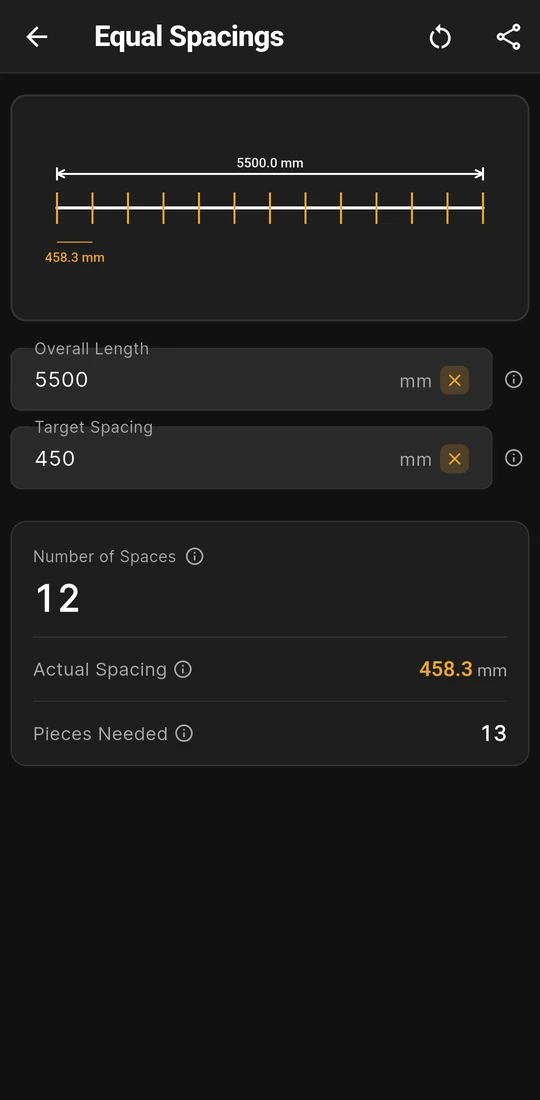
5500 mm at a 450 mm target: 12 spaces of 458.3 mm
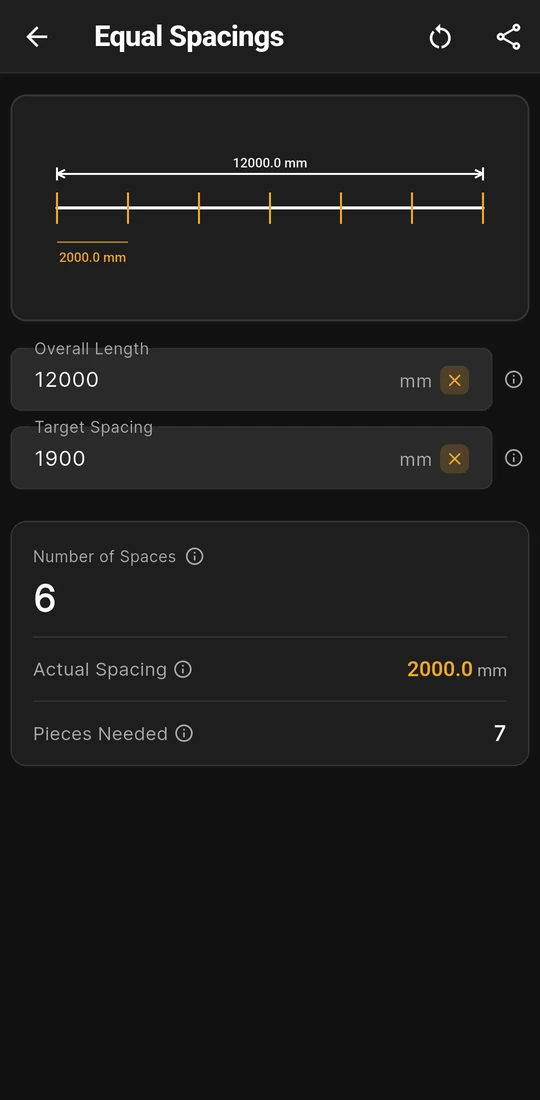
12000 mm at 1900 mm: 6 spaces of 2000.0 mm


Equal Spacings, field by field
Equal Spacings divides one length into gaps that all match, as close to the spacing you'd like as a whole number of spaces allows. Fence posts, ceiling battens, shelf supports and rows of noggings all fit. Open Home ▸ Equal Spacings, enter two numbers, and the results and a drawing of the marks update as you type. How it compares with other apps is in is there an equal spacing calculator app for posts, studs and pickets?
| Field | In or out | What it means |
|---|---|---|
| Overall Length | You enter | The span to divide: centre to centre for posts, or inside face to inside face when the ends are fixed. Above 0. |
| Target Spacing | You enter | The spacing you'd like between marks. Above 0 and less than the Overall Length. |
| Number of Spaces | Result | Overall Length ÷ Target Spacing, rounded to the nearest whole number. The headline figure. |
| Actual Spacing | Result | Overall Length ÷ Number of Spaces: the gap every space gets, shown to a tenth of a millimetre. |
| Pieces Needed | Result | Number of Spaces + 1: posts, studs or marks, counting both ends. |
Both fields start empty and keep their last values for next time. The marks are points with no width of their own. For pieces with a width that must keep every gap under a limit, use Baluster Spacing; for a fixed interval measured from a start point, Running Measurements.
Worked example: 5500 mm split at about 450 mm
- Number of Spaces: 5500 ÷ 450 = 12.22, and the nearest whole number is 12.
- Actual Spacing: 5500 ÷ 12 = 458.33 mm, shown as 458.3 mm.
- Pieces Needed: 12 + 1 = 13.
Every gap comes out 8.3 mm wider than the 450 you asked for, because 12.22 rounded down. Rounding to the nearest can go either way, so Actual Spacing can land over the target or under it. The second screen shows it going over on a fence line: 12000 mm at a 1900 mm target is 6.32, so 6 spaces of 2000.0 mm and 7 posts, 100 mm more than the target.
That matters when the target is really a limit. Divide the length by the limit and round up yourself, then type the length divided by that whole number as the Target Spacing: the app gives the same count back, with every gap at or under the limit. Spacing deck posts evenly works it through for posts.
What you see on the screen
- A line with a tick at every mark. The Overall Length is labelled above the line and the Actual Spacing under the first space. It draws ticks for the first 20 marks, so with more than 19 spaces the far end of the line has none; the results are not affected.
- A note on every field. Each ⓘ button opens a short note and a fuller page with its own drawing. Target Spacing's note lists common targets: 450 and 600 mm for studs and 1800 and 2400 mm for posts, or 16 in, 24 in, 6 ft and 8 ft in feet and inches.
- Feet and inches. With Settings ▸ Units ▸ Default units ▸ Imperial (ft/in), both fields take feet, inches and a fraction, and Actual Spacing reads to the fraction set in Settings ▸ Units ▸ Fraction precision. Changing units clears the fields.
- Share results. Share as Text or Share as PDF sends both inputs and the three results, and the PDF adds the drawing.
- No list of marks. Equal Spacings stops at the spacing; the questions below show how to get each mark from one end.
Equal Spacings and Pro
Equal Spacings is one of the 13 Pro calculators; Concrete, Stairs and Check Square are the free ones. Without Pro you can open it, type a length and see the line drawn, but the results are blurred and the spacing on the drawing is locked until you unlock. Pro is a subscription or a one-time lifetime unlock; Google Play shows the plans and prices in your currency, so none are quoted here.
Spacing limits you might divide to, by country
Equal Spacings is often used to spread members evenly under a maximum set by a maker or a standard. Some maximums the site has checked against a named source:
| Country | What is spaced | Maximum | Where it comes from |
|---|---|---|---|
| Australia | Ceiling framing under 10 mm Gyprock Plus, wind N1 to N4 | 450 mm centres (600 mm for 13 mm Gyprock Standard) | Gyprock Red Book 2, Table 13: joist spacing in Australia |
| Australia | Rows of noggings in a timber stud wall | 1350 mm apart, in the 2006 edition of AS 1684 | Noggin spacing |
| New Zealand | Ceiling battens under 10 mm GIB plasterboard | 450 mm (600 mm for 13 mm) | GIB Site Guide, April 2024: joist spacing in New Zealand |
| United Kingdom | Floor joists under 18 mm CaberFloor chipboard | 450 mm centres (600 mm for 22 mm) | West Fraser: joist spacing in the UK |
| Anywhere | Fence posts | The fence maker's figure; no single one applies | How many fence posts do I need |
Each of these is a maximum, so round the count up as above rather than trusting the nearest whole number. The noggin guide's 3000 mm wall is a good case. Its 2910 mm of stud between the plates, typed in with 1350 as the target, rounds to 2 spaces of 1455 mm, too far apart; round up to 3 by hand, type 970, and the app gives 3 spaces of 970.0 mm. The maker's guide, the standard and your council, building consent authority or building control decide what applies; the app checks none of it.
Rules in more detail: building codes by country, from Australia's NCC to New Zealand's Building Code, England's Approved Documents and the US IRC.
Questions about Equal Spacings
What happens if the target is longer than the length?
No result shows. Target Spacing has to be less than Overall Length, and a red note under the field says "Spacing must be less than overall length". A length shorter than one space has nothing to divide.
Should the Overall Length go to post centres or faces?
Centre to centre when the pieces are set out by their centres, such as posts and studs; inside face to inside face when the ends are fixed walls and you want equal clear gaps. Pieces Needed counts both ends either way, so take two off if the end pieces are already there.
Can I get a list of the marks to measure from one end?
Yes, with a second calculator. Type the Actual Spacing as the Interval in Running Measurements, leave its Start empty and ask for as many marks as there are spaces. Its running table then lists each mark from the same end, and its Speak button reads them out; the last one should land within a millimetre of your Overall Length.
How is it different from Stud Counter?
Stud Counter keeps the spacing you give it and counts the studs, leaving a short gap at the end of the wall. Equal Spacings changes the spacing so that every gap matches and there is no odd one out.
Guides that go deeper
- Is there an equal spacing calculator app for posts, studs and pickets?
- How do I divide a length into equal spaces?
- How many fence posts do I need, and how far apart should they be?
- How do you space deck posts evenly?
- How many fence panels do I need for a run?
Get MeisterCalc
MeisterCalc runs on Android 7.0 or later and works every calculation out on the phone, so Equal Spacings works with no signal along a fence line. Concrete, Stairs and Check Square are free to try before you unlock Pro.