Square up calculator app: Check Square gives the diagonal and the racking gap
Published · Updated · By Sai Nath
Check Square is the free square-up calculator in MeisterCalc. Target Diagonal turns a length and width into the corner-to-corner reading of a square frame, and Is It Square? takes your two tape readings and shows the racking gap and which corners to push. A 4800 × 3600 mm frame is square when both diagonals read 6000 mm.
Try it free on the web: Diagonal calculator, in your browser with nothing to install.
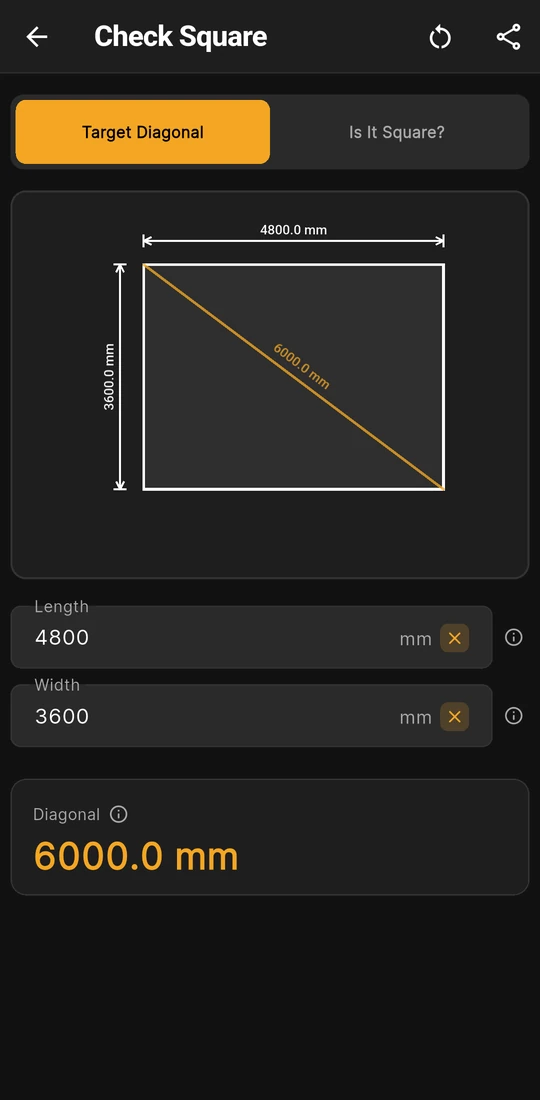
Target Diagonal: 4800 × 3600 mm reads 6000.0 mm
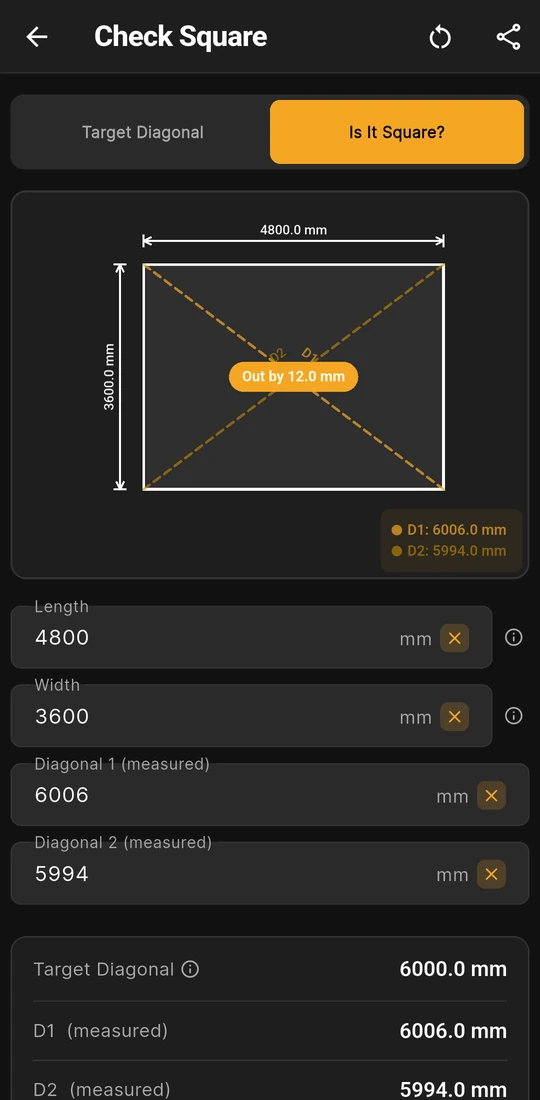
Is It Square?: diagonals of 6006 and 5994 mm
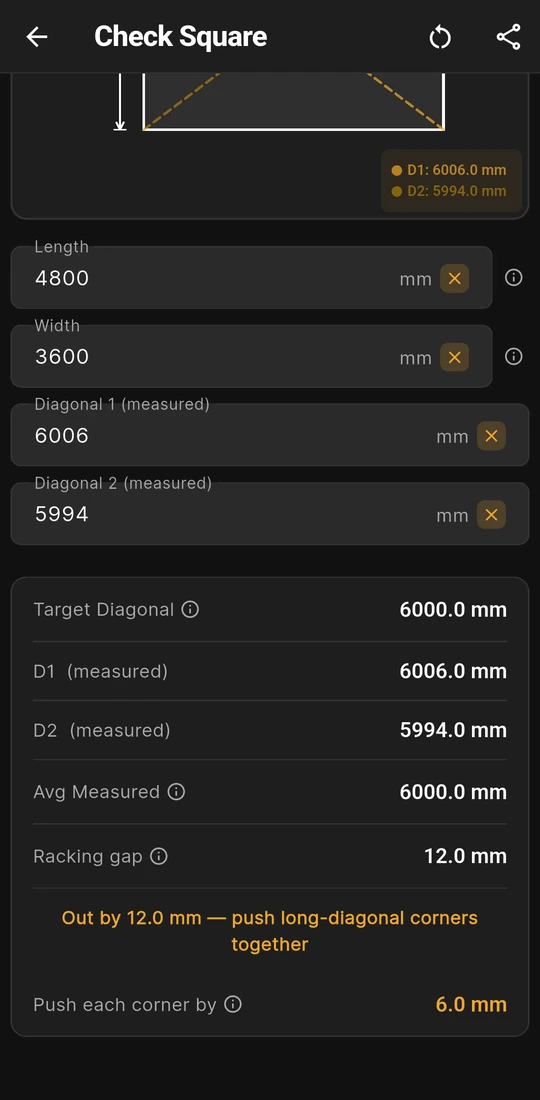
Racking gap 12.0 mm, push each corner by 6.0 mm


What does Check Square work out?
Two things, one for each mode on the switch at the top of Home ▸ Check Square. Target Diagonal tells you what a frame's diagonals should read when every corner is 90°. Is It Square? takes the two diagonals you measured and tells you how far out the frame is and which way to move it. Nothing is pre-filled, and every field has to be above 0.
| Mode | You enter | You get |
|---|---|---|
| Target Diagonal | Length and Width | Diagonal: √(Length² + Width²), the reading both diagonals of a square frame share |
| Is It Square? | Length, Width, Diagonal 1 (measured) and Diagonal 2 (measured) | Target Diagonal, D1 (measured), D2 (measured), Avg Measured, Racking gap, a status line and, when the frame is out, Push each corner by |
On the Is It Square? card, Avg Measured is the mean of your two readings and Racking gap is the difference between them. Below that, the status line turns green with SQUARE ✓ when the readings are less than 1 mm apart, or amber with "Out by … — push long-diagonal corners together". The last row, Push each corner by, is half the racking gap.
Read that last figure as the distance the long diagonal has to come in. If the two corners at its ends each moved the full amount, the long diagonal would shorten by the whole gap and the frame would rack the other way. Push a little at a time, measure both diagonals again and type the new readings until the card says SQUARE ✓.
Worked example: squaring a 4800 × 3600 mm frame
- Target Diagonal: the sides are 4 × 1200 and 3 × 1200 mm, so the frame is a 3-4-5 triangle scaled up by 1200 and its diagonal is 5 × 1200 = 6000 mm. The app works it the long way, √(4800² + 3600²), and shows Diagonal 6000.0 mm.
- Tape both diagonals of the real frame from the same point at every corner, switch to Is It Square? and enter the sides and the two readings. The second screen above has readings of 6006 and 5994 mm.
- Avg Measured: (6006 + 5994) ÷ 2 = 6000.0 mm, the same as Target Diagonal, which points to the sides being right and only the angle being out.
- Racking gap: 6006 − 5994 = 12.0 mm, and Push each corner by shows 6.0 mm. The 6006 mm diagonal has to come in by 6 mm to 6000 mm, and the 5994 mm one grows by about as much.
- Push the corners at the ends of the long diagonal towards each other, re-measure, and enter the new pair. Once the card reads SQUARE ✓, fix a brace before the frame can move.
What you see on the screen
- A drawing for each mode. Target Diagonal draws the rectangle with its length and width dimensioned and the diagonal in amber, corner to corner. Is It Square? draws both diagonals dashed and labelled D1 and D2, with an Out by badge where they cross and a key giving both readings.
- A coloured verdict. Green for SQUARE ✓ and amber for Out by, easy to read at arm's length on a slab.
- Notes behind ⓘ. Length, Width, the diagonal, Avg Measured, Racking gap and Push each corner by each have an ⓘ button with a short note and a fuller page with its own drawing. The two measured diagonals don't.
- Feet and inches. Settings ▸ Units ▸ Default units ▸ Imperial (ft/in) switches every field to feet, inches and a fraction: an 8 × 4 ft sheet reads 8' 11 5/16" corner to corner. Changing units clears the fields.
- Share results. Share as Text or Share as PDF sends the inputs and results, including the Out by line and the push figure, and the PDF adds the drawing.
Try the square-up maths in your browser
The same two modes run on this site with no install, in millimetres. The web version also suggests the largest 3-4-5 triangle that fits your frame, in 100 mm steps, for setting out the first corner.
Is Check Square free?
Yes. Check Square is one of three free calculators in MeisterCalc, with Stairs and Concrete. Both modes, every result row, the drawing and sharing work without Pro, and nothing is blurred. The other 13 calculators need Pro, a subscription or a one-time lifetime unlock; Google Play shows the plans and prices in your currency, so none are quoted here.
Squareness tolerances by country
No page on this site gives a single "out of square" figure from a building code, and the 1 mm behind SQUARE ✓ is the app's own threshold, not a building tolerance. Who sets the number for a job:
- Australia: the drawings, the specification and your certifier, under the NCC and your council. The Western Australian Guide to Standards and Tolerances (2019 edition) gives no squareness or diagonal figure; see how far out of square is acceptable.
- New Zealand: your consented plans and the building consent authority, under the NZ Building Code (MeisterCalc in New Zealand).
- England: the drawings and building control (MeisterCalc in the UK).
- United States: the permit drawings and your building department (MeisterCalc for US jobs).
The next layer matters as much as the rule. A sheet floor or a straight fascia shows a lean that board ends can hide, so turn the racking gap into degrees and millimetres of lean with the method in that guide, then agree it with whoever signs the work off.
Rules in more detail: building codes by country, from Australia's NCC to New Zealand's Building Code, England's Approved Documents and the US IRC.
Questions about Check Square
Why does Is It Square? ask for the Length and Width?
To show Target Diagonal beside your readings. The verdict compares your two diagonals with each other, not with the target. The target catches a different mistake: if Avg Measured sits well away from it, a side is the wrong length or the readings came from different points, and pushing corners won't fix that.
Can it set out a 3-4-5 corner?
Yes, through Target Diagonal. Enter two sides in the ratio 3 to 4, such as 3000 and 4000 mm, and Diagonal reads 5000.0 mm, the length to swing the tape to. A bigger triangle squares a corner more accurately, so use the biggest your string lines allow.
Does it work for an L-shaped slab or a single triangle?
One rectangle at a time. Split an L shape into two rectangles and check each. For one right-angled triangle, such as a brace or a rafter, use Triangles.
Does it check level or plumb?
No. It checks that the corners are square in plan, from tape readings you take, and it is only as good as those readings: the same reference point at every corner and a straight, tight tape.
Do I need an account or a signal to use it?
No. Check Square is free from the first open, with no sign-in, and every sum runs on the phone, so it works on a slab with no reception.
Guides that go deeper
- How do I check if a frame is square?
- How far out of square is acceptable for a deck, shed or frame?
- What should the diagonal be to square up a frame, and which way do I push?
- How do I square a deck frame?
- How do I use the 3-4-5 rule to set out a right angle?
- How do I set out a building or slab square?
Get MeisterCalc
MeisterCalc runs on Android 7.0 or later and works every calculation out on the phone, so Check Square works with no signal on site. It is free, with nothing to unlock.