Is there a decking calculator app that works in lineal metres?
Published · Updated · By Sai Nath
Yes. MeisterCalc is an Android app whose Decking calculator works in millimetres and returns boards across, lineal metres and the amount to order with 10% added. It is a paid calculator, not one of the three free ones. A 6 m × 4 m deck, 90 mm boards, 5 mm gaps: 258 m, so order 283.8 m.
Checked on 28 October 2026: what the calculator asks for, what it returns and what it costs to unlock, taken from the app's own code and its Google Play listing. The example below was worked by hand and matches the app's formula.
What does the Decking calculator work out?
You enter four measurements. It returns the quantities you need to order boards. Open Home ▸ Decking, and a diagram of the deck updates as you type.
| You enter | You get |
|---|---|
| Deck Length (the way the boards run) | Total Area in m² |
| Deck Width | Boards Across |
| Board Width (the face of one board) | Lineal Metres |
| Board Spacing (the gap) | Order (+10%) |
| Optional: Price per lineal metre and a Wastage percentage | Total Cost, and the cost with the wastage added (at 10.00 per metre: 258 × 10.00 = 2580.00, and 258 × 1.10 × 10.00 = 2838.00) |
The board width has to be less than the deck width, and the spacing can be zero or more. Share results sends the numbers as text or a PDF.
Worked example: a 6 m × 4 m deck
This is the sum the app does. Deck length 6000 mm, deck width 4000 mm, boards 90 mm wide, 5 mm gap.
- Area: 6 × 4 = 24 m².
- Boards across: 4000 ÷ (90 + 5) = 42.1, rounded up to 43.
- Lineal metres: 43 × 6 = 258 m.
- Order: 258 × 1.10 = 283.8 m.
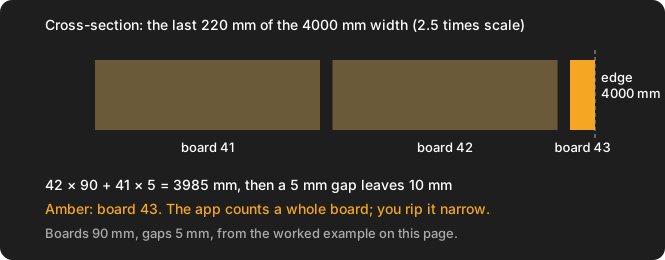
One limit to know about. Forty-two boards and their 41 gaps cover 42 × 90 + 41 × 5 = 3985 mm, so after the next 5 mm gap only 10 mm of the 4000 mm is left for the 43rd board. The app counts it as a whole board, which is safe for ordering. On site you would nudge the gap or rip the last board narrow (what to do when the last deck board is too narrow). Gap sizes depend on the board and its maker, so check decking board gaps and the maker's instructions. The step-by-step version is in how many decking boards do I need, and square metres to lineal metres of decking covers the conversion if you only have an area.
Is the decking calculator free?
The app is free to download, but Decking is not one of the free calculators. Concrete, Stairs and Check Square are free. The other 12, Decking included, unlock with a weekly subscription that starts with a 3-day free trial, or with a one-time lifetime unlock. Google Play shows the prices in your currency, so none are quoted here. If you are weighing subscription against one-off apps, see construction calculators you buy once.
Does it work offline, and on iPhone?
Every calculation runs on the phone, so it works without signal on site. The app uses the network only for purchases, product analytics and crash reports. It is Android only, and the website says Android 7.0 or later. There is no iPhone version yet; you can join the iOS waitlist. The interface is in English.
Can I use it in metres, feet and inches?
It is metric-first, with millimetres as the default for Australia, New Zealand and the UK. Switch with Settings ▸ Units ▸ Default units ▸ Imperial (ft/in) if you work in feet and inches. The lineal metre result is the headline answer, because that is how decking is usually sold here.
What else does the deck job need from the app?
The boards are one step. Three other calculators in the app help around them, and all three are free:
- Check Square. Square the frame before you lay a board. How to square a deck frame shows the diagonal check, with Home ▸ Check Square ▸ Is It Square? doing the arithmetic.
- Concrete ▸ Holes. Volume for post footings, with 10% extra. See how much concrete for a post hole.
- Stairs. Rises and goings for deck steps. See how many steps for a floor height.
What the Decking calculator doesn't do
- It does not size or space joists, and it does not count screws or hidden fixings.
- It lays one run of boards per row. Picture-frame borders, fascia and diagonal layouts are not covered, so add those boards yourself.
- It gives lineal metres, not a count of boards. It does not plan stock lengths or joins.
- It rounds up to whole boards, so a thin last row is counted in full.
- It does not make a deck compliant. Joist spans, fixings and board gaps come from the board maker, the National Construction Code or your local code, and your council.
Other apps cover some of this. If picture frames and screws matter to you, compare a few before you pay: the free-tier and decking comparison lists what each app's own listing says, and see the best construction calculator apps for Android.
Get it
The app is on Google Play. The listing has the current price options and version, and 100+ downloads with no ratings yet at the time of checking.