How many studs do I need for a wall?
Published · Updated · By Sai Nath
Divide the wall length by the stud spacing, round up to a whole number, then add one for the closing stud at the end. A 3.6 m wall needs 9 studs at 450 mm centres and 7 at 600 mm. That is a straight run of common studs only: corners, openings and junctions are extra.
Sizes on this page are metric. The sum works in feet and inches too, as long as the wall length and the spacing are in the same unit. Checked on 28 October 2026: every figure below was worked by hand and matches the formula in MeisterCalc's Stud Counter.
How do I calculate how many studs I need for a wall?
- Divide the wall length by the on-centre spacing (the distance from the centre of one stud to the centre of the next).
- Round up to the next whole number, never down.
- Add one for the stud that closes the far end.
In short: studs = ⌈length ÷ spacing⌉ + 1. Measure the whole wall from end to end, and use the same unit for both numbers.
Why add one, and why round up?
Studs sit at 0, then at one spacing, two spacings and so on. A wall with 8 gaps between studs has 9 studs, the same way 8 spaces between fence posts need 9 posts. The "+ 1" is that last stud.
Rounding up covers walls that are not an exact multiple of the spacing. A 4.0 m wall at 450 mm is 4000 ÷ 450 = 8.89, so you need 9 gaps and 10 studs, and the last gap is just shorter than the others. Rounding down would leave a gap wider than the spacing you planned.
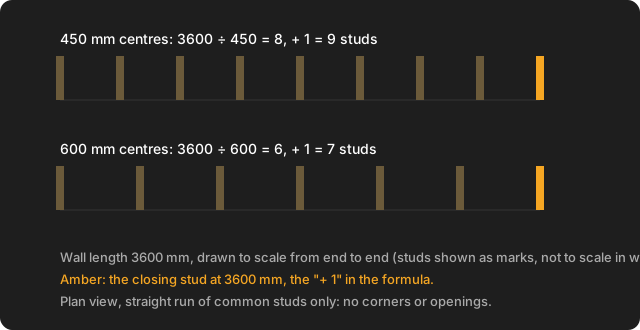
How many studs are in a 3.6 m wall?
Nine at 450 mm centres, seven at 600 mm centres.
- At 450 mm: 3600 ÷ 450 = 8 exactly, so 8 + 1 = 9 studs.
- At 600 mm: 3600 ÷ 600 = 6 exactly, so 6 + 1 = 7 studs.
For other lengths, here is the same sum worked for common wall lengths. Counts are common studs in a straight run only.
| Wall length | At 450 mm | At 600 mm |
|---|---|---|
| 2.4 m | 2400 ÷ 450 = 5.33, up to 6, +1 = 7 | 2400 ÷ 600 = 4, +1 = 5 |
| 3.0 m | 3000 ÷ 450 = 6.67, up to 7, +1 = 8 | 3000 ÷ 600 = 5, +1 = 6 |
| 3.6 m | 8, +1 = 9 | 6, +1 = 7 |
| 4.0 m | 4000 ÷ 450 = 8.89, up to 9, +1 = 10 | 4000 ÷ 600 = 6.67, up to 7, +1 = 8 |
| 5.0 m | 5000 ÷ 450 = 11.11, up to 12, +1 = 13 | 5000 ÷ 600 = 8.33, up to 9, +1 = 10 |
| 6.0 m | 6000 ÷ 450 = 13.33, up to 14, +1 = 15 | 6000 ÷ 600 = 10, +1 = 11 |
You do not need a separate answer for each length: put your own number through the three steps. A 12 foot wall at 16 inch centres is 144 ÷ 16 = 9, so 10 studs, by the same rule.
Which stud spacing should I use?
Use the spacing on your plans, engineering or frame supplier's layout. It depends on the wall, what it carries, the cladding and the region, so this page does not pick one for you. The standard usually used for timber-framed houses in Australia is AS 1684.2, Residential timber-framed construction (non-cyclonic areas) and its design rules are not free to read, so its figures are left off this page. Checked on 28 October 2026: no spacing figure is stated here as a rule.
Each country has its own page: stud spacing in Australia, under NZS 3604 in New Zealand and for a UK stud wall. The 450 and 600 mm columns above are there because they are the two spacings people ask about most, not because either one suits your wall.
What does the count leave out?
The formula counts a straight run of common studs. It does not include:
- extra studs at corners and where a wall meets another wall (T-junctions),
- studs around door and window openings (jambs, trimmers and the studs beside them) and their lintels,
- noggings, plates and bracing,
- any deduction for the space an opening takes out of the run.
How many extra studs a corner or opening takes depends on the framing detail on your plans, so count them from the drawings and add them to the figure above. Allowing a few spare studs for those is a builder's habit, not a standard. For the layout itself, see how to mark out studs at 450 or 600 centres, and for the rest of a wall's framing, the wall framing calculations guide.
How do I work out the stud length?
Take the ceiling height and subtract the thickness of the top and bottom plates together. That is the cut length of a common stud. With a 2400 mm ceiling and 45 mm plates top and bottom (an example size): 2400 − 45 − 45 = 2310 mm. The plate sizes come from your plans or supplier, so measure or read them rather than assume. A wall with a raked (sloping) top needs a different length for each stud, so this single length does not apply to it.
How many lineal metres of timber do I need for the studs?
Lineal metres = number of studs × stud length. Take the 3.6 m wall with 2.4 m studs:
- At 450 mm: 9 × 2.4 = 21.6 m.
- At 600 mm: 7 × 2.4 = 16.8 m.
Studs come in fixed lengths from the supplier, so ask what is stocked before you work out how many pieces to buy.
How much extra should I order, and what does it cost?
Add an allowance for cuts, bowed pieces and mistakes. MeisterCalc's Stud Counter defaults to 10%, and its help text suggests 15% for walls with many openings or a complex layout. Those are the app's own defaults, not a code figure, so adjust them to your job.
By hand, 21.6 m + 10% = 23.76 m, and 16.8 m + 10% = 18.48 m. For cost, multiply the studs by the price per stud, then by 1 + the wastage. With a price of P per stud, the 9-stud wall costs 9 × P, and 9 × P × 1.10 with 10% wastage. Use your supplier's real price for P. As an example only, at $12.50 a stud: 9 × 12.50 = $112.50, and 112.50 × 1.10 = $123.75. The Stud Counter shows the same two figures as Total Cost and Cost + 10% Waste.
One distinction worth knowing: the Stud Counter applies the wastage to the cost, not to the stud count, and it does not output a "lineal metres with waste" figure. The 23.76 m above is the hand sum.
How many studs do I need for a whole room or shed?
Count each wall on its own and add the totals; do not divide the perimeter as one long run. Each wall has its own ends. Take a 4.8 m × 3.6 m room at 450 mm centres:
- Each 4.8 m wall: 4800 ÷ 450 = 10.67, up to 11, +1 = 12. Two walls: 24.
- Each 3.6 m wall: 9. Two walls: 18.
- Total by wall: 24 + 18 = 42 studs, or 42 × 2.4 = 100.8 m at 2.4 m studs.
That counts each wall's end studs separately, so the corner studs are included once per wall and your corner detail may need more or fewer. Take doors and windows out and add their framing from the plans.
How do I use the Stud Counter in MeisterCalc?
- Open MeisterCalc and tap Stud Counter on the home screen.
- Enter Wall Length, On-Centre Spacing (450 mm is filled in to start) and Stud Height.
- Read Number of Studs and Total Linear. The wall diagram updates as you type.
- To price it, enter a Price per stud under Cost (optional). A Wastage slider (0 to 30%, 10% to start) then appears, and you get Total Cost and Cost + N% Waste.
- Tap the share icon to send the numbers as text or a PDF.
The wall length, spacing and height must each be greater than 0. Everything is in millimetres by default; Settings ▸ Units ▸ Default units ▸ Imperial (ft/in) switches to feet and inches. For the 3.6 m wall above, entering 3600, 450 and 2400 gives Number of Studs 9 and Total Linear 21600.0 mm (21.6 m).
What the Stud Counter doesn't do
- It counts common studs in one straight run. It does not add corner, junction, jamb or trimmer studs, lintels, noggings, plates or bracing.
- It does not take openings out of the length. Count them from the plans.
- It does not know stock lengths, so it gives lineal metres, not a list of pieces.
- It does not roof-frame: there are no rafters or roof framing in the app.
- Spacing, sizes and fixing come from your plans, the National Construction Code or the local code, the frame supplier and the council. The app does not make a wall compliant.
Before you order
Confirm the spacing, the stud sizes and lengths, and the corner and opening details with your plans and supplier. If you are marking the wall out next, the same spacing sets your marks: how to mark out studs. If you are building a deck or floor as well, see how many joists you need, and our decking board guide works the lineal metres for the surface.
Try it
Stud Counter is not one of the three free calculators. Concrete, Stairs and Check Square are free; the other 12, Stud Counter included, unlock with a weekly subscription that starts with a 3-day free trial, or with a one-time lifetime unlock, and Google Play shows the prices in your currency. It works offline on Android 7.0 or later. There's no iPhone version yet; you can join the iOS waitlist.