How do I calculate a reduced level (RL) from staff readings?
Published · Updated · By Sai Nath
Add the staff reading on the benchmark to the benchmark’s reduced level (RL): that is the height of instrument (HI). Then subtract the staff reading on the point from HI. With a benchmark of 15.250 m and readings of 1.340 and 2.180, HI is 16.590 m and the point’s RL is 14.410 m.
What do the words mean?
- Reduced level (RL): the height of a point measured from a common datum. The Wikipedia article on reduced level describes it as equating the elevations of survey points to a common assumed vertical datum (checked on 28 October 2026).
- Datum: the zero the levels are measured from. It can be real, such as mean sea level, or assumed. Surveyors in Australia usually quote the Australian Height Datum (AHD), as the Wikipedia article on AHD explains (checked on 28 October 2026).
- Benchmark (BM): a point whose RL you already know. The Wikipedia article on benchmarks calls it any item used to mark a point as an elevation reference (checked on 28 October 2026).
- Backsight (BS): the staff reading on the benchmark, the point of known level.
- Foresight (FS): the staff reading on the point whose level you want.
- Height of instrument (HI): the RL of the line of sight. It stays the same until the level is moved.
The reduced level formula
Two lines cover the height of instrument method:
- HI = benchmark RL + backsight
- RL of the point = HI − foresight
The Wikipedia article on levelling describes the same idea: the reading on the known point lets the height of the instrument above the datum be computed, and the reading on the new point lets its elevation be computed (checked on 28 October 2026). Setting up the level and reading the staff are covered in how to use a dumpy level, so this page sticks to the sums.
How do I find a reduced level with the HI method?
- Write down the benchmark RL. Take it from the surveyor’s plan, or give a fixed point an assumed RL such as 100.000 m.
- With the level set up, read the staff on the benchmark. That is the backsight.
- Add them: HI = benchmark RL + backsight.
- Without moving the level, read the staff on the point. That is the foresight.
- Subtract: RL = HI − foresight.
- For more points, read each one from the same set-up and subtract each foresight from the same HI.
Worked example, line by line
The benchmark RL is 15.250 m. The staff reads 1.340 m on the benchmark, then 2.180, 0.960 and 3.020 on points A, B and C.
| Point | Backsight (m) | Foresight (m) | HI (m) | RL (m) |
|---|---|---|---|---|
| Benchmark | 1.340 | 16.590 | 15.250 | |
| A | 2.180 | 14.410 | ||
| B | 0.960 | 15.630 | ||
| C | 3.020 | 13.570 |
- HI = 15.250 + 1.340 = 16.590 m
- A = 16.590 − 2.180 = 14.410 m
- B = 16.590 − 0.960 = 15.630 m
- C = 16.590 − 3.020 = 13.570 m
Use three decimal places: the staff is read to the millimetre.
Why add the backsight but subtract the foresight?
The staff reading is the distance from the ground up to the line of sight, and the line of sight is above both points. On the benchmark, the line of sight is the benchmark’s RL plus that distance, so you add. On the new point, the ground is that distance below the line of sight, so you subtract.
A quick check on the sign: a bigger staff reading means lower ground. Point A read 2.180, more than the 1.340 on the benchmark, so A must be lower: 0.840 m lower (2.180 − 1.340), and 15.250 − 0.840 = 14.410. Point B read less, so it must be higher than the benchmark, and it is (15.630). If your answer goes the wrong way, the sign is the first thing to look at.
What does a negative reduced level mean?
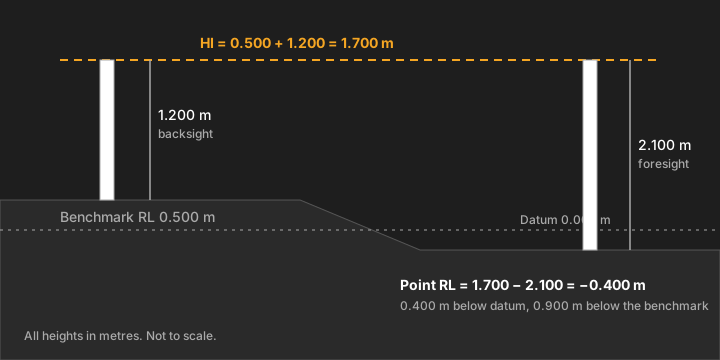
A negative RL means the point is below the datum. Take a benchmark of 0.500 m, a backsight of 1.200 and a foresight of 2.100.
- HI = 0.500 + 1.200 = 1.700 m
- RL = 1.700 − 2.100 = −0.400 m
The point is 0.400 m below datum and 0.900 m below the benchmark (2.100 − 1.200). Keep the minus sign when you write it down. If the datum is assumed, a negative number only means lower than the point you called zero.
Height of instrument or rise and fall?
Both methods give the same RLs. They differ in the arithmetic.
- Height of instrument: work out HI once, then subtract each foresight from it, as above. It is quickest when you read many points from one set-up.
- Rise and fall: compare each reading with the one before it. If the new reading is smaller, the ground has risen by the difference; if larger, it has fallen. Add the rise to, or subtract the fall from, the previous RL.
Here is the worked example both ways. Readings run in order: 1.340, 2.180, 0.960, 3.020.
| Point | Reading (m) | Rise (m) | Fall (m) | RL (m) |
|---|---|---|---|---|
| Benchmark | 1.340 | 15.250 | ||
| A | 2.180 | 0.840 | 14.410 | |
| B | 0.960 | 1.220 | 15.630 | |
| C | 3.020 | 2.060 | 13.570 |
The rise and fall method has a built-in check: total rises minus total falls must equal the last RL minus the first. Here that is 1.220 − (0.840 + 2.060) = −1.680, and 13.570 − 15.250 = −1.680. The height of instrument method checks only if you close on a known point. The Wikipedia article on levelling says such a closure check “guards against blunders”. Choose rise and fall for a few readings when you want every line checked, and HI for many points from one set-up. Either way, a level run for a permit or a drainage fall belongs to a surveyor.
Can I calculate reduced level in Excel?
Yes, it is two formulas. With the benchmark RL in B1 and the backsight in B2, put =B1+B2 in B3 for HI. For each foresight in column C, =$B$3-C5 gives the RL. Keep every reading in metres. With the worked numbers, B3 shows 15.250 + 1.340 = 16.590, and a foresight of 2.180 in C5 gives 16.590 − 2.180 = 14.410.
Doing it in the MeisterCalc Dumpy Level calculator
Open MeisterCalc, tap Dumpy Level on the home screen and choose Mode A — BM On Ground or Mode B — BM Not On Ground (a benchmark on a ledge or windowsill). The formula and the three boxes are the same; the mode only changes the diagram.
- Enter the Benchmark RL: 15.250.
- Enter the Staff Reading at BM: 1.340.
- Enter the Staff Reading at Measure: 2.180.
- The Height of Instrument (HI) shows 16.590 and the Measured RL shows 14.410.
For another point, change only the Staff Reading at Measure. The calculator works in metres whatever the unit setting, accepts negative numbers, and can share the result as text or PDF.
What goes wrong?
- The wrong sign. Add the backsight to the benchmark RL, then subtract the foresight from HI. Do the high-reading-means-lower-ground check.
- Mixing millimetres and metres. 1340 and 1.340 are the same reading. Pick one unit.
- Moving the level between the backsight and the foresight. HI is only valid for one set-up.
- A leaning staff. It reads long. Keep it upright.
- Unequal sight lengths. The Wikipedia article on levelling notes that keeping them about equal helps cancel curvature and refraction errors (checked on 28 October 2026).
Check back by closing on a known point. For the fall between two RLs, see how to calculate fall.
What the app doesn’t do
- It uses the height of instrument method only, with no rise and fall method.
- It does one point at a time: no reading table, no intermediate sights, no closing check and no adjustment of a misclosure.
- It doesn’t check your numbers. A mistyped reading, such as 13.4 for 1.340, gives a wrong RL with no warning, so sanity-check the answer.
- It doesn’t teach set-up or reading the staff.
- Required levels for building work are set by the NCC, the NZ Building Code or Approved Documents, and your local council, not by the app.
Once you have two RLs and the distance between them, slope of land and driveway gradient turn them into a slope.
Try it
Dumpy Level is one of the MeisterCalc calculators that unlock with a weekly subscription that starts with a 3-day free trial, or with a one-time lifetime unlock; Google Play shows the prices in your currency. Concrete, Stairs and Check Square are free. It works offline, on Android 7.0 or later. There’s no iPhone version yet; you can join the iOS waitlist.