Which construction calculator apps can you buy once, without a subscription?
Published · Updated · By Sai Nath
We compared 11 apps on whether the listing offers a one-time payment, what stays free and what it names. The Carpentry Calculator says its payment is one time only and BuildCalc is paid up front. Chippy Tools and MeisterCalc (ours) offer a subscription or a one-time unlock; Construction Master Pro is a trial then a subscription.
We make MeisterCalc, so read this with that in mind. We have not run these apps on a job site. Every fact about another app comes from its own Google Play listing, App Store page or website, linked in the cell or sentence where it is stated. A listing is what the maker says. “Not stated” means the page we read does not say, not that the app lacks it. Prices come from each listing, in Play Australia dollars with the date; MeisterCalc’s price comes from Google Play in your own currency, so none is quoted here. We did not buy or test any of these apps for this page. Prices change by country and day, so this page gives price models, not MeisterCalc prices, and quotes a competitor’s price only where its own listing states one.
How are the apps judged?
On four questions, all from the listing: is there a one-time payment, is it stated by the developer or only implied, what stays free, and which calculators it covers. The 11 apps are those in the same Google Play searches (construction, carpentry, stair, concrete, builder, chippy, tradie and roof pitch calculators) with real install numbers.
Which construction calculator apps have a one-time purchase?
Each cell links to the page it comes from. The Play “in-app items” ranges mix every item a developer sells, so they are not the price of a lifetime unlock and are left out except where noted.
For the wider question of which app does which job, see the best construction calculator apps for Android. If you use Construction Master Pro and want to leave its subscription, see Construction Master Pro alternatives.
Which of the 15 calculators do the one-time apps have?
A one-time payment is no use if the app lacks the calculator you need. Here is what each of the apps with a one-time route names, out of MeisterCalc’s 15.
“Named” means the listing uses a word we can match to one of MeisterCalc’s 15 calculators. A calculator that is not named is not stated, which does not mean the app lacks it: The Carpentry Calculator lists “balustrades (level and raked)” and “roofing” (listing), which may cover Baluster Spacing and Pitch, and BuildCalc calls itself a “Full Construction Master Pro emulation”. The two apps we only know as stair or roof specialists are counted by what their listings name.
Is there a construction calculator without a subscription?
Yes, on these listings: The Carpentry Calculator and BuildCalc point to a single payment, and Chippy Tools and MeisterCalc each have a one-time route beside a subscription. Construction Master Pro and RedX Stairs show subscriptions and no one-time option on the pages we read.
Two cautions. The Carpentry Calculator’s answer is a developer reply from April 2025, not text in the listing itself, so confirm it in the app before you pay. And Chippy Tools’ one-time route is stated in a developer reply, while its site says what is available can differ by region, so look at what your own Play listing offers.
Is Chippy Tools free?
The download is free and its Google Play listing says Baluster Spacing is the free calculator; the other calculators are premium. Its site offers a 7-day trial of the Pro calculators with no card. Google Play AU lists in-app items from $3.99 to $129.99 per item (2026-10-29), and the developer says Pro is a subscription or a one-time payment. Where it is stronger than us: it has far more reviews (215 on Google Play against none for MeisterCalc) and iPhone support.
What does “lifetime” or “one-time” actually mean?
On Google Play it means one charge with no renewals. Google’s developer documentation defines a one-time product as “a single transaction that grants access to the purchased content permanently or for a specific, non-renewable use”. A non-consumable one is “permanently associated with the user’s account, and cannot be purchased again” (Google Play Billing: one-time products, checked on 28 October 2026).
What it does not tell you is what the purchase covers. That is the developer’s choice, so read the listing for these points:
- Which calculators it unlocks. Today’s set, or also ones added later? Most listings do not say, so treat future features as not included unless the developer states otherwise.
- Whose lifetime. It is tied to your Google account, not to the app being updated for ever. An app that stops being updated still stops.
- A new phone. Look for a Restore Purchase button and sign in to the same Google account. MeisterCalc has one on its paywall; check for the same in any app you buy.
Is a one-time purchase cheaper than a subscription?
It is cheaper once you have used the app for longer than the one-time price divided by the weekly price. The sum is the same for any app: break-even weeks = one-time price ÷ weekly price.
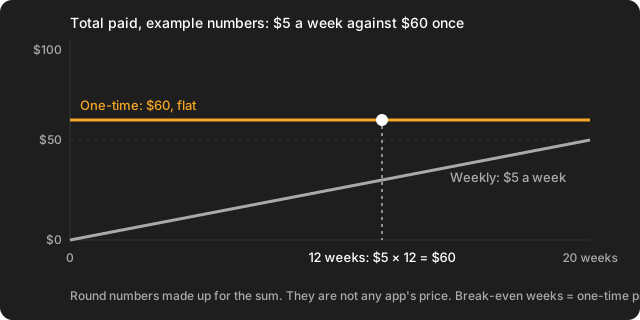
Worked example with made-up numbers: a weekly plan at $5 and a one-time unlock at $60. After 12 weeks the weekly plan has cost $5 × 12 = $60, the same as the one-time payment. At 20 weeks it has cost $100. So a one-off job of two weeks favours the subscription, and a tool you will use on every job for a year favours the one-time unlock. Put the prices from your own Google Play listing in the sum, in your own currency.
A free trial changes the start of the sum, not the end. Google says that if you cancel during a free trial, “the subscription remains active until the end of the trial” and you are not charged when it ends (Google Play Billing: subscriptions, checked on 28 October 2026).
How do you check before you buy?
- Open the Google Play listing and scroll to “In-app purchases” for the range. It does not say which item is the subscription.
- Read the developer replies under the reviews. Two of the answers above come from there.
- Open the app and find the paywall before you pay. The one-time option is often a smaller button under the subscription.
- Check what is free first. Calculators you can use without paying show how the app works before you commit.
- Put a reminder in your phone for the day a trial ends.
How do you cancel a trial, and can you get a refund?
Cancel in Google Play, not by uninstalling. Google’s steps: go to subscriptions in Google Play, select the subscription, tap Cancel subscription and follow the instructions. Google says “When you uninstall the app, your subscription won’t cancel”, and after you cancel you keep access for the time you have already paid for (Google Play Help: cancel a subscription, checked on 28 October 2026).
For refunds, Google says that within 48 hours “You may be able to get a refund depending on the details of the purchase”, and after 48 hours you contact the developer. An app or game can be returned for a refund only once, and a purchase of several items is refunded as a whole (Google Play Help: refunds, checked on 28 October 2026). Do not count on one: the developer’s own terms apply after that.
What do MeisterCalc’s free and paid parts look like?
MeisterCalc is an Android construction calculator, metric-first for Australia, New Zealand and the UK. Concrete, Stairs and Check Square are free. The other 12 calculators unlock with either a weekly subscription with a 3-day free trial or a one-time lifetime unlock, priced by Google Play in your currency. The paywall labels the lifetime button “one-time, no renewals” and has a Restore Purchase button. Calculations run offline; the network is used only for purchases, product analytics and crash reports.
Plainly, where it falls short:
- No rafter, hip or valley cuts, no birdsmouths, no stair landings or winders, no board feet, no roof area. The Carpentry Calculator and Construction Master Pro cover rafters, and no cut-list optimiser.
- No feet-inch keypad arithmetic. Imperial is a setting, not a tape-maths keypad.
- Small: 100+ installs and no public rating yet on Google Play (checked on 2026-10-29).
- Android only (Android 7.0 or later). iPhone is a waitlist. The interface is English only.
- Roofing and geometry calculators are planned for a later version with no date, so we do not promise the lifetime unlock includes them.
To try before paying, use the free ones. Check Square is explained in how to check if a frame is square, and Concrete in the concrete calculator guide. For stairs, see the stair calculator app page.
Facts about other apps on this page were checked on 2026-10-29 (29 October 2026) against the sources linked; App Store and website facts were read on 28 October 2026 and say so where they appear. Spotted something out of date? Write to meruappsdev@gmail.com.