Asphalt calculator app: tonnes of asphalt or tarmac for a driveway
Published · Updated · By Sai Nath
The Asphalt calculator in MeisterCalc turns a length, width and compacted thickness into cubic metres and tonnes of asphalt, with 10% added to order. It starts at 2400 kg/m³; use your mix's figure. A 10000 × 3000 mm driveway laid 50 mm thick is Volume 1.500 m³, Weight 3.600 t and Order (+10%) 3.960 t. Asphalt comes with Pro.
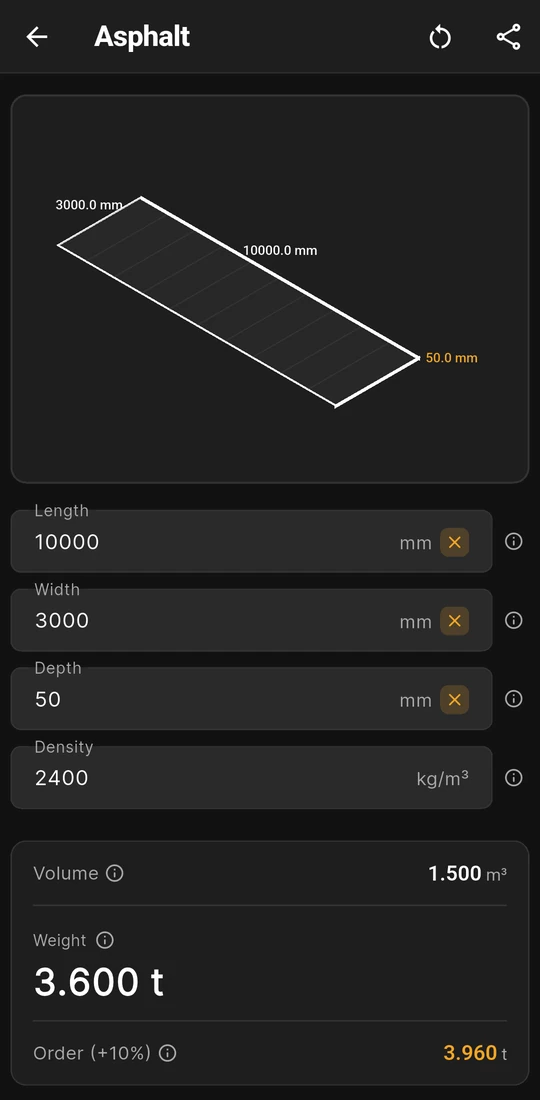
A 10 × 3 m drive at 50 mm: 3.600 t
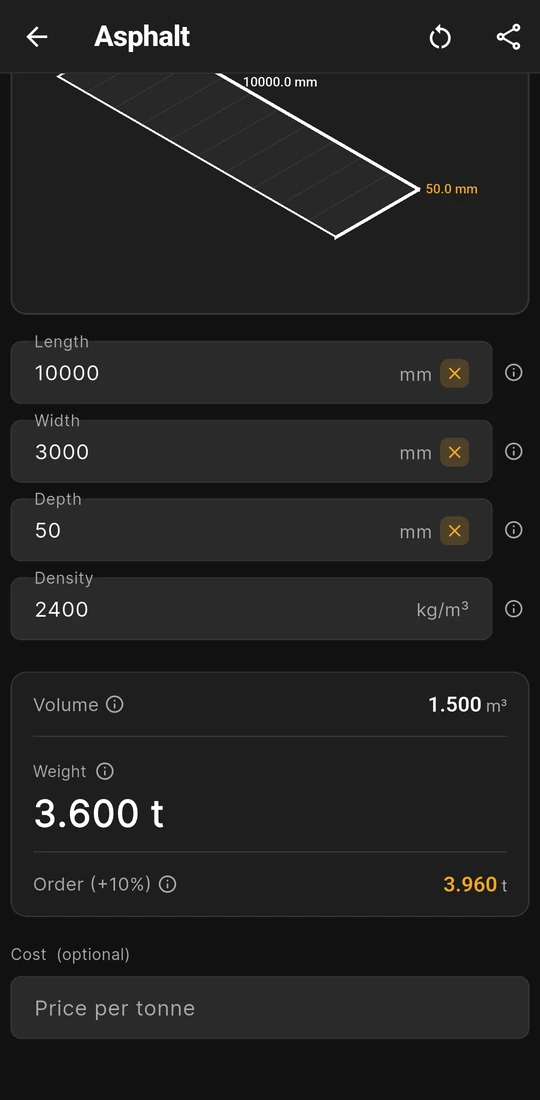
Order (+10%) 3.960 t, and Price per tonne below


What the Asphalt calculator works out
It answers the tonnage question for a hot-laid surface: how much asphalt a driveway, a path, a parking bay or a patch takes at a given thickness. Asphalt is ordered in tonnes, while a contractor may quote you by area and thickness; the calculator links the two. Open Home ▸ Asphalt.
| Field | Input or result | For asphalt |
|---|---|---|
| Length | Input | The run of the drive or path. |
| Width | Input | Measured square to the length. Split a flared entry into rectangles. |
| Depth | Input | The compacted thickness after the roller, one course at a time. |
| Density | Input | Starts at 2400 kg/m³, which the ⓘ note calls dense-graded asphalt. Use your mix's compacted figure. |
| Volume | Result | Length × Width × Depth, in m³ to three decimal places. |
| Weight | Result | Volume × Density ÷ 1000, in tonnes. The large figure on the card. |
| Order (+10%) | Result | Weight × 1.10, in tonnes, for edges, an uneven base and the end of a load. |
Asphalt keeps its own last sizes and density, apart from Gravel and Soil, which share the same screen design with their own starting densities.
Worked example: 30 m² of drive in one 50 mm course
The drive is 10000 × 3000 mm, laid in one course 50 mm thick after rolling, at the starting density. These are the sizes from how much asphalt (tarmac) do I need for a driveway?, shown in the app in the screens above.
- Volume: 10 × 3 × 0.05 = 1.5 m³. The app shows Volume 1.500 m³.
- Weight: 1.5 × 2400 ÷ 1000 = 3.6 t, shown as Weight 3.600 t.
- Order: 3.6 × 1.10 = 3.96 t, shown as Order (+10%) 3.960 t.
A thin layer makes the thickness count. On a 50 mm course, 10 mm is a fifth of the job, so a centimetre's error moves the tonnes by a fifth. Take the thickness from the contractor's specification, not from a look at the kerb.
Courses, base and density
- One course per run. A drive laid as a base course and a thinner wearing course is two runs of the calculator, each with its own thickness and, if the mixes differ, its own density. Add the two Weights. The ⓘ note on Depth gives the wearing course and the base course separate ranges for this reason.
- The base is not asphalt. The crushed rock or road base underneath is a separate order in tonnes. Work it out in the Gravel calculator with the supplier's density for that material.
- Density comes from the mix. 2400 kg/m³ is the app's starting figure, not a plant's. Ask for the compacted tonnes per cubic metre of the exact mix being quoted and type it in. Clear sets the field back to 2400, and outside 100 to 5000 kg/m³ the card doesn't appear.
- Not for cold-lay bags. Bagged cold-lay tarmac is a different product with its own coverage printed on the bag. Read the bag, not this sum.
What you see on the screen
- A dark grey 3D slab that redraws with each number, with the length and width on its edges and the thickness in amber. At 50 mm over 10 m it is a thin sheet, a quick check that you typed millimetres and not centimetres.
- Cost (optional). A Price per tonne gives Total Cost, the Weight × your price, and Cost + 10% Waste, with a Wastage slider from 0 to 30% that changes the cost lines only. Contractors often quote a laid price by area and thickness and look after the tonnage themselves, so check who orders before you compare figures.
- Feet and inches. Imperial (ft/in) under Settings ▸ Units ▸ Default units turns the sizes into feet, inches and fractions. Density stays in kg/m³ and the results stay in cubic metres and metric tonnes.
- Share results as text or PDF, to send the contractor the sizes, density and tonnes you worked from.
Is the Asphalt calculator free?
No. Asphalt is one of the 13 calculators that come with Pro. Without Pro you can open it, enter the drive and see it drawn, but the results stay blurred until you unlock. Only Concrete, Stairs and Check Square are free. Pro is a subscription or a one-time lifetime unlock; Google Play shows the plans and prices in your currency.
Asphalt, tarmac or blacktop: by country
| Country | Usual name | Weight unit | Guide |
|---|---|---|---|
| Australia and New Zealand | Asphalt | Tonnes of 1000 kg, as the app shows | names, tonne or ton |
| United Kingdom | Tarmac | Tonnes of 1000 kg | names, tonne or ton |
| United States | Blacktop | American pages quote tons, a different unit from the app's tonnes | names, tonne or ton |
Whatever the name, the sum is the same; bitumen is the binder inside the mix, not the finished surface. Thickness, base depth and the fall of the drive come from the contractor, the engineer or the council, and how do I work out the gradient of a driveway? covers the slope. Check with your local council, building consent authority, building control or certifier when the drive needs approval.
Rules in more detail: building codes by country, from Australia's NCC to New Zealand's Building Code, England's Approved Documents and the US IRC.
Questions about Asphalt
Should I enter the loose or the compacted thickness?
The compacted thickness, after the roller, together with the compacted density of the mix. Paired that way, the tonnes match what the finished surface holds. A loose depth with a compacted density, or the other way round, throws the answer out.
Can it work out a patch or a pothole?
Yes, as a small rectangle. Square off the patch, enter its length, width and depth, and read the Weight. For a few bags of cold-lay repair, use the coverage printed on the bag instead.
Why only 10% on the Order row?
It is the app's fixed allowance for edges, an uneven base and the end of a load, and it can't be changed. For more, add it to the Weight yourself. The Wastage slider changes only the cost lines.
Does it show the area in square metres?
Not as a row. The area is Length × Width, so the 10000 × 3000 mm drive is 30 m², and the area × the thickness in metres gives the Volume row. How do you convert square metres to cubic metres? shows the step.
Does Asphalt work out the base or the fall?
No. The base is a separate material, so use Gravel with that material's density. For the fall across a drive, the Dumpy Level calculator turns staff readings into levels.
Guides that go deeper
- How much asphalt (tarmac) do I need for a driveway?
- How much road base (or Type 1) do I need?
- How do I convert cubic metres to tonnes for gravel, soil and sand?
- How do I work out the gradient of a driveway?
- How do you convert square metres to cubic metres?
Get MeisterCalc
MeisterCalc runs on Android 7.0 or later and works the tonnes out on the phone, so Asphalt works with no signal on site. Asphalt comes with Pro.