How do I divide a length into equal spaces?
Published · Updated · By Sai Nath
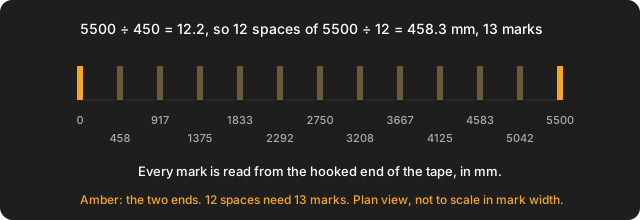
Divide the length by the spacing you want and round to a whole number of spaces. Divide the length by that number to get the exact gap. Add one to get the marks, posts or pieces. For 5500 mm at about 450 mm, that is 12 spaces of 458.3 mm and 13 marks.
The sum is plain arithmetic, so it works in any unit if you keep to one. The examples are in millimetres, the way most chippies set out. Every figure below was worked by hand and rechecked. This page gives no spacing rules: how far apart studs, posts or shelf supports must be comes from the plans, the maker's instructions and the local rules.
How do I divide a length into equal spaces?
- Pick the spacing you would like. Call it the target. For example, 450 mm.
- Count the spaces: length ÷ target, rounded to a whole number. 5500 ÷ 450 = 12.22, so 12 spaces.
- Find the exact gap: length ÷ spaces. 5500 ÷ 12 = 458.33 mm.
- Count the marks: spaces + 1. 12 spaces need 13 marks, counting both ends.
The target is a wish and the exact gap is what you build. The two differ a little unless the target divides the length evenly, and that is fine: every gap is the same, and none is a short leftover at the end.
Why is it one more mark than spaces?
Each space has a mark at both ends, and neighbouring spaces share one. So 1 space has 2 marks, 2 spaces have 3, and 12 spaces have 13. This is the "fencepost" counting error, and Wikipedia's page on off-by-one errors uses the same example: a fence with 10 sections needs 11 posts. Checked on 28 October 2026. The reverse also holds: if you have a number of posts or shelves already, the spaces are that number minus one.
If the ends are fixed walls or uprights and only the middle pieces are new, subtract the two ends. Our 12 spaces have 11 middle marks. Decide this before you order.
What if the spacing does not divide the length exactly?
Round the number of spaces, not the gap. Stepping out 450 mm at a time along 5500 mm gives 12 full gaps and a leftover of 100 mm at the end. Instead, use 12 spaces and divide again: 5500 ÷ 12 = 458.3 mm. Each gap is 8.3 mm over the target, and no gap is odd one out.
Rounding to the nearest whole number can make the gaps slightly larger than the target, as it does here. If the target is a hard maximum, round up instead: 5500 ÷ 450 = 12.22, up to 13 spaces, and 5500 ÷ 13 = 423.1 mm, which is under 450. The fence post page does the same thing: how many fence posts do I need.
How do I measure and mark equal spacing without errors adding up?
Hook the tape on one end and leave it there. Read every mark off that one tape: do not move the tape forward from mark to mark, because each small error is carried into the next. For 12 spaces of 458.33 mm the marks, measured from the start, are:
| Mark | Distance from start (mm) |
|---|---|
| 0 | 0 |
| 1 | 458 |
| 2 | 917 |
| 3 | 1375 |
| 4 | 1833 |
| 5 | 2292 |
| 6 | 2750 |
| 7 | 3208 |
| 8 | 3667 |
| 9 | 4125 |
| 10 | 4583 |
| 11 | 5042 |
| 12 | 5500 |
These are rounded to the nearest whole millimetre, which is as close as a pencil mark gets. Mark each one with a small cross, not a line, and square a line from the cross. The last mark must land on the end of the length: if it does not, one of the marks above it is wrong. For marking studs from a set start point, see how to mark out studs.
What counts as the length: centre or edge?
It depends on what you are spacing, so decide it before measuring. For posts or studs set out by their centres, measure from the centre of the first to the centre of the last. For gaps between boards or panels, measure from the inside face of one end to the inside face of the other, and the pieces then sit inside that length. MeisterCalc's own help describes the overall length for Equal Spacings the same way: inside face to inside face, or centre to centre for posts, depending on the layout. Whichever you pick, use the same one at both ends. For example, posts 100 mm wide with 2000 mm clear between their faces are 2000 + 100 = 2100 mm centre to centre.
How do I work out equal spacing for shelves?
Say a wall unit is 1800 mm wide between two uprights and you want gaps of about 350 mm. 1800 ÷ 350 = 5.14, so 5 spaces. 1800 ÷ 5 = 360 mm each. The two uprights are the first and last marks, so there are 4 shelves or dividers between them, each 360 mm from the next. The same sum applies to the height of a bookcase, with shelf thickness taken off the length first if you want clear gaps. For 4 shelves of 18 mm in the 1800 mm opening: 1800 − 4 × 18 = 1728 mm of clear space, and 1728 ÷ 5 = 345.6 mm for each clear gap.
How do I work out equal spacing for panelling?
A 2400 mm wall with battens about 600 mm apart: 2400 ÷ 600 = 4 exactly, so 4 spaces and 5 battens, 600 mm apart. A 3000 mm wall at about 450 mm is not so tidy: 3000 ÷ 450 = 6.67, so 7 spaces of 3000 ÷ 7 = 428.6 mm, and 8 battens. Battens have width, so measure centre to centre, or take the batten width off first and divide what is left. For the 3000 mm wall with 8 battens 45 mm wide: 3000 − 8 × 45 = 2640 mm, and 2640 ÷ 7 = 377.1 mm clear between battens. The spacing that suits your cladding or lining comes from its maker.
What about equally spaced objects on a computer?
Drawing and layout programs have their own commands for dividing a line or distributing objects, and most name them differently. They are outside this page, which covers a tape and a pencil. The sum above is the same one they run.
How do I use MeisterCalc to divide a length?
- Open MeisterCalc and tap Equal Spacings on the home screen.
- Enter Overall Length (5500) and Target Spacing (450).
- Read Number of Spaces (12), Actual Spacing (458.3 mm) and Pieces Needed (13).
A live diagram redraws the marks as you type. To change units, go to Settings ▸ Units ▸ Default units and choose Imperial (ft/in). Share results sends the numbers as text or a PDF. To read a long list of marks hands-free off one tape, Running Measurements has a Speak button on its running table. For pickets or balusters with a fixed gap, use Baluster Spacing instead.
What are the limits?
- Equal Spacings rounds to the nearest whole number of spaces. It has no maximum-gap mode and cannot round up. For a hard maximum, work the round-up by hand, then enter length ÷ that number as the target.
- It returns nothing if the target is zero or is not less than the overall length.
- It does not divide a circle or work from a fixed gap or item width.
- It does not know what spacing your job needs. For fences and pickets see picket fence spacing; the plans and local rules decide the rest.
Common questions
How many marks for 12 spaces?
13. Marks = spaces + 1.
What if it does not divide evenly?
Round the number of spaces, then divide the length by that number again.
Do I measure to the centre or the edge?
Centre to centre for things set out by their centres, inside face to inside face for gaps. Use the same at both ends.
Does it work in feet and inches?
Yes. In MeisterCalc, set Settings ▸ Units ▸ Default units to Imperial (ft/in). The sum is the same in any unit.
Try it
Concrete, Stairs and Check Square are the free calculators; the other 12, Equal Spacings included, unlock with a weekly subscription that starts with a 3-day free trial, or with a one-time lifetime unlock, and Google Play shows the prices in your currency. It works offline on Android 7.0 or later. There's no iPhone version yet; you can join the iOS waitlist.