How many fence posts do I need, and how far apart should they be?
Published · Updated · By Sai Nath
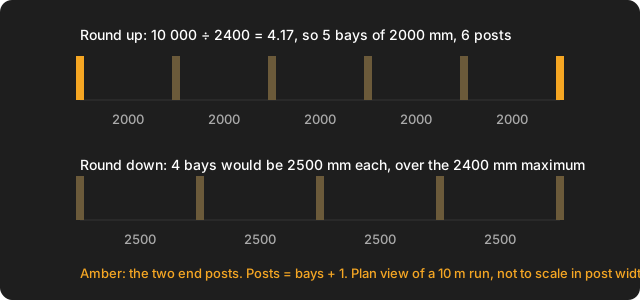
Divide the fence run by the maximum spacing for your panels or rails, round up to whole bays, then add one post for the end. A 10 m run with a 2.4 m maximum needs 5 bays of 2000 mm and 6 posts. Space the bays equally, measured centre to centre.
Sizes are metric, and the sum works the same in feet if you keep one unit throughout. Checked on 28 October 2026: every figure below was worked by hand and matches the formulas in MeisterCalc's Equal Spacings and Concrete calculators. This page covers a straight run of post-and-rail or panel fence. It does not give a legal height, a hole depth or a maximum spacing, because those come from the fence maker, an engineer and your council, not from a calculator.
How do I work out how many fence posts I need?
- Measure the run from the centre of the first post to the centre of the last.
- Find the maximum bay (the distance between two posts) in the fence or panel maker's instructions.
- Divide and round up: bays = run ÷ maximum, rounded up to a whole number.
- Add one: posts = bays + 1.
- Make the bays equal: each bay = run ÷ bays. It will be at or under the maximum.
Why is it bays plus one?
Both ends of a run need a post. One bay has two posts, two bays have three, ten bays have eleven. The most common mistake is to divide the run by the spacing and order that many posts: it leaves you one short. A 10 m run at 2000 mm is 5 bays, but it needs 6 posts.
Rounding up matters for a different reason. The maker's figure is a maximum, so a bay may be shorter but never longer. If the run is not an exact multiple, rounding down gives bays that are too wide.
How far apart should fence posts be?
As far apart as the maker of your fence allows, and no further. There is no single spacing for every fence: it depends on the panel or rail, the timber or steel, the height, how exposed the site is and the local rules. For that reason this page does not state a universal figure, and no official free source gave one that holds for every fence when checked on 28 October 2026. Read the installation sheet that comes with the panels, rails or palings, or ask the supplier or the council. A US calculator quotes about 8 feet for a wood fence (Inch Calculator, checked on 28 October 2026), but that is a rule of thumb from another country, not a maker's limit you can rely on here.
Fences for stock, such as wire, cattle, goat or barbed-wire fencing, follow different spacing because the wire is under tension and there are strainer posts. That is outside this page: look for your state or national rural fencing guide.
How do I space fence posts evenly?
Divide the run by the number of bays, not by the maximum. For 10 m with a 2.4 m maximum, 10 000 ÷ 2400 = 4.17, so 5 bays. Then 10 000 ÷ 5 = 2000 mm. Mark posts at 0, 2000, 4000, 6000, 8000 and 10 000 mm, measuring each one from the first post so errors do not add up. This avoids the awkward short bay at the end that you get from stepping out 2.4 m at a time.
If your fence is panels with fixed widths, the bay is the panel width plus whatever the maker specifies for the posts, so use their dimension. The same dividing method is in how to divide a length into equal spaces.
How many posts for common runs?
With a 2.4 m maximum bay, rounded up and spaced equally:
| Run | Run ÷ 2.4 m, rounded up | Equal bay | Posts |
|---|---|---|---|
| 3.0 m | 1.25, up to 2 bays | 1500 mm | 3 |
| 4.8 m | 2 bays exactly | 2400 mm | 3 |
| 6.0 m | 2.5, up to 3 bays | 2000 mm | 4 |
| 7.2 m | 3 bays exactly | 2400 mm | 4 |
| 10 m | 4.17, up to 5 bays | 2000 mm | 6 |
| 15 m | 6.25, up to 7 bays | 2142.9 mm | 8 |
| 20 m | 8.33, up to 9 bays | 2222.2 mm | 10 |
For a different maximum, swap 2.4 for yours. For a closed loop, such as a pen, there is no end post, so posts equal bays: a 12 m loop at the same 2.4 m maximum is 12 ÷ 2.4 = 5 bays of 2400 mm, and 5 posts, not 6. That is a separate case from the straight run above.
How do I use MeisterCalc to space fence posts?
- Do the round-up sum by hand: bays = run ÷ maximum, rounded up. For 10 m and 2.4 m that is 5.
- Open MeisterCalc and tap Equal Spacings on the home screen.
- Enter Overall Length (10000) and Target Spacing (2000, which is the run ÷ 5 bays).
- Read Number of Spaces (5), Actual Spacing (2000 mm) and Pieces Needed (6). Pieces Needed is your post count.
- Check that Actual Spacing is at or under the maker's maximum.
One catch: Equal Spacings rounds to the nearest whole number of spaces, not up. If you enter the 2.4 m maximum as the target for the 10 m run, 4.17 rounds down to 4 spaces and Actual Spacing shows 2500 mm, which is over the maximum. That is why the target above is the run divided by your rounded-up bays. The target must be greater than 0 and less than the overall length. The app's help says to measure post centre to centre. Equal Spacings is not one of the three free calculators.
How much concrete do I need for the post holes?
Work out one hole as a cylinder, then multiply by the number of posts. A 300 mm wide hole, 800 mm deep, for the 6 posts above:
- One hole: π × 0.15² × 0.8 = 0.0565 m³.
- Six holes: 0.0565 × 6 = 0.3393 m³.
- With 10% extra: 0.3393 × 1.10 = 0.3732 m³ to order.
These figures treat the whole hole as concrete. The post takes up part of it, so the true amount is a little less, and the 10% covers spills and uneven holes anyway. The hole size and depth are for the fence maker or an engineer to set: they depend on the post, the soil and the height. A bag count depends on the product's yield, so check your bag; makers' figures are in how many bags of concrete make a cubic metre. More on holes is in concrete for post holes.
- Open MeisterCalc and tap Concrete, then the Holes tab.
- Enter Diameter (300), Depth (800) and Number of Holes (6).
- Read Per Hole, Total and Order (+10%). Concrete is one of the free calculators.
What about corners, gates and slopes?
The count above is for a straight, level run. A corner or a gate adds posts, a gate post usually needs a bigger one, and a fence that steps down a slope is measured along each step, not as one length. Count those from your design or the maker's instructions and add them. MeisterCalc has no corner, gate or slope option, and it does not do pickets, rails or panels. For pickets on the rails, see picket fence spacing.
Is balustrade post spacing the same?
No. Balustrade and handrail posts have their own rules, set by the building code, and a safety gap between balusters applies as well. Do not use the fence method for them. See balustrade gaps in Australia for that question.
What does this page not cover?
- Legal rules: height limits, dividing fences, boundaries and when you need approval. These differ by state, council and country, so ask your council, not this page.
- Hole depth, post size, bracing and stock fencing.
- Rails, palings and panels: for decking boards on a frame instead, see how many decking boards, and for studs, how many studs.
Try it
Concrete, Stairs and Check Square are the free calculators; the other 12, Equal Spacings included, unlock with a weekly subscription that starts with a 3-day free trial, or with a one-time lifetime unlock, and Google Play shows the prices in your currency. It works offline on Android 7.0 or later. There's no iPhone version yet; you can join the iOS waitlist.