How do I set out a building or slab square?
Published · Updated · By Sai Nath
Fix string lines on profiles just outside the building's edges. Square one corner with a 3-4-5 triangle, as large as your lines allow. Set the other corners from the plan lengths, then measure both diagonals. If opposite sides match and the diagonals are equal, it is square. If not, move the corners until they are.
How to square a building, step by step
This works for a house or shed set-out, a slab, formwork or a deck footing layout. You need a tape, string line, pegs or profile boards, a helper and a notebook. For a rectangle up to a few metres a single person can do it, but a second pair of hands keeps the tape and lines straight.
- Mark the baseline. From the plan, mark one outside edge of the building with two pegs and pull a string line between them. Measure from your reference (the boundary, the existing house or a set-out peg given by the surveyor) using the plan's dimension, not by eye.
- Set up profiles. Hammer a profile board (a horizontal board on two stakes, set back from the corner) just outside each corner. Put a nail or saw cut in the top of each board where the string line will sit. The string can then come off for digging and go back on at exactly the same place.
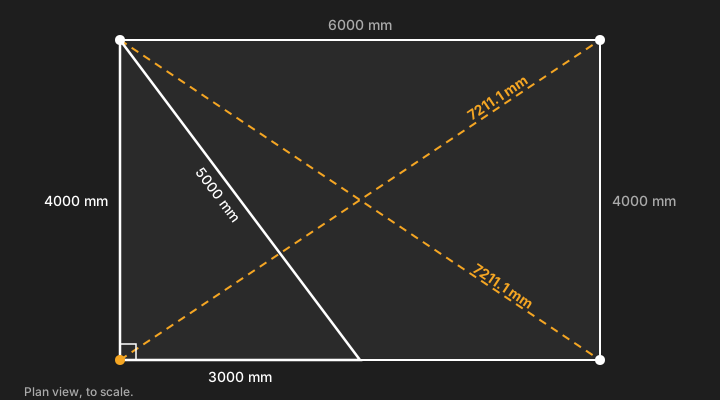
- Square the first corner with 3-4-5. Measure 6 m along the baseline from the corner and mark the string. Measure 8 m along the second line (running roughly at right angles) and mark it. Then slide the second line until the two marks are exactly 10 m apart (6² + 8² = 36 + 64 = 100, and √100 = 10). The corner is now 90°. Use the largest multiple the site allows (see the next section for why). The diagram below uses 3 m and 4 m legs because the short side of that set-out is only 4 m.
- Run the other lines. Measure the plan's length along each line to find the other corners and set the remaining profiles. Check that the two long sides are the same length and the two short sides are the same.
- Measure both diagonals, corner to corner, from the same point on each corner (the string intersection, or a plumb bob dropped from it). Keep the tape tight and straight, and write both readings down.
- Compare them with the target diagonal. For a 6000 × 4000 mm set-out both should read 7211.1 mm. If one reads more, move the string lines at the ends of the longer diagonal towards each other by half the difference, then measure both again.
- Lock it in and re-check. Fix the string at each profile, then measure the diagonals once more before you excavate, fix formwork or pour. A bumped line is much cheaper to find now than after the concrete.
Why does 3-4-5 work, and why go big?
A triangle with sides in the ratio 3:4:5 has a right angle between the two shorter sides, because 3² + 4² = 5². Any multiple works the same way: 600-800-1000 mm, 3-4-5 m or 6-8-10 m. That is Pythagoras' theorem and its converse; see the Pythagorean theorem and 3-4-5 triangle pages. Our 3-4-5 rule guide goes into it further.
Use the biggest multiple your lines allow. A 5 mm slip in a mark on a 600 mm triangle is a visible angle error, and when you extend that line 10 m it grows into a large miss. The same 5 mm on a 6 m leg barely changes the angle. In numbers, 5 mm on a 600 mm leg is atan(5 ÷ 600) = 0.48°, which is about 83 mm of miss at the end of a 10 m line (10 000 × 0.00833). On a 6000 mm leg it is 0.048°, about 8 mm at 10 m. That is practical advice rather than a rule from a standard: it is simple geometry.
What should the diagonals measure?
When a rectangle is square, each diagonal is the hypotenuse of a right-angled triangle: diagonal = √(length² + width²). Two worked examples:
- 6000 × 4000 mm: √(36 000 000 + 16 000 000) = √52 000 000 = 7211.1 mm.
- 4800 × 3600 mm: √(23 040 000 + 12 960 000) = √36 000 000 = 6000.0 mm exactly, because it is a 3-4-5 shape.
A small square shed base of 3600 × 3600 mm (about 11.8 × 11.8 ft) works the same way: 3600² + 3600² = 25,920,000, so the diagonal is √25,920,000 = 5091.2 mm (about 16.7 ft). Our frame-squaring guide has a table of common sizes.
The diagonals don't match: which way do I move?
First check the sides. Equal diagonals prove a right angle only when opposite sides are equal. A rectangle with one side longer than the other can give equal diagonals and still not be square, so fix any side that is off before you trust the diagonals.
If the sides are right and the diagonals differ, the set-out has racked into a parallelogram. Move the two corners at the ends of the longer diagonal towards each other, keeping the side lengths, until both diagonals read the same. The long diagonal comes in by half the difference. Example: a 4000 × 3000 mm set-out reads 5011 mm and 4989 mm. The difference is 22 mm, so the long diagonal comes in by 11 mm to 5000 mm, which is √(4000² + 3000²). Re-measure after every move.
How do I square a building with just a string?
Use the string lines as the straight edges and the tape for the 3-4-5 and the diagonals. The string should be taut so it does not sag or drift in wind, and the lines at the corners should cross at the same height, or the measurement is skewed. Use a plumb bob to bring each crossing down to the ground or to the formwork, and measure from those points.
What are profile boards for?
Profiles (called batter boards in some places) are temporary frames set beyond the corners of a planned foundation. They hold the string lines that mark the edges and corners, so the lines survive digging. See the batter board entry for the idea. Put them far enough back that excavators and trenching do not hit them, and set the nail or cut on each one from your squared lines before you dig.
How do I check a concrete slab, formwork or shed base is square?
The method is the same, with one rule: measure from the same edge at every corner. On formwork, use the inside faces for an inside dimension (the size of the slab) or the outside faces for the outer size, and do not mix them. For an L-shaped slab, split the plan into rectangles and check each one. For a finished slab, the diagonals still work on the edge or on marked points, but there is nothing left to move, so check before you pour. If you are working out the concrete order for the slab, see how much concrete you need.
Doing it in MeisterCalc
The free Check Square calculator does the target diagonal for any size, and tells you how far out your two readings are. Its two modes are Target Diagonal and Is It Square?. The square-up diagonal calculator page covers it in more detail.
- Open MeisterCalc and tap Check Square on the home screen.
- Choose Target Diagonal, then enter the Length and Width of the set-out. For 6000 × 4000 it shows 7211.1 mm, and for 4800 × 3600 it shows 6000.0 mm.
- After you measure on site, choose Is It Square?. Enter the Length and Width, then Diagonal 1 (measured) and Diagonal 2 (measured).
- Read the result card: Target Diagonal, both readings, Avg Measured and the Racking gap. It shows SQUARE ✓ or “Out by … — push long-diagonal corners together”.
- If it is out, move the corners until both diagonals read the same (the long one comes in by half the racking gap), measure again and re-enter.
- Tap the share icon and choose Share as Text or Share as PDF to send the numbers on.
Everything is in millimetres by default. For feet, inches and sixteenths, go to Settings ▸ Units ▸ Default units ▸ Imperial (ft/in).
How close is close enough?
The allowable out-of-square for a slab, footing or frame is set by your drawings, the specification, the engineer and the building rules for your area (in Australia the NCC and the local council, in New Zealand the Building Code and the council). The app does not know it, and this page does not give a figure. Check Square calls a result square when the diagonals are less than 1 mm apart; that is the app's own cut-off, not a tolerance for work. Boundary distances and setbacks are on your plan or from your surveyor and council: confirm them before you set out.
What Check Square doesn't do
- It does not set out points or measure anything. You take the tape readings and the answer is only as good as they are.
- It handles one rectangle at a time, so for an L-shaped plan check each rectangle.
- It checks square, not level or plumb. For levels, see how to use a dumpy level.
- It cannot tell you a side is the wrong length: it takes the Length and Width you enter.
- It does not make a set-out compliant with any code. The rules come from your plans and the authorities.
Sources
The maths and terms above come from Pythagorean theorem, 3-4-5 triangle and batter board, checked on 28 October 2026. No tolerance or building-code figure is quoted, because none has been checked against an official source.
Try it
Check Square is one of three MeisterCalc calculators that are free to use, along with Stairs and Concrete. It works offline, on site with no signal, on Android 7.0 or later. The other 12 calculators unlock with a weekly subscription that starts with a 3-day free trial, or with a one-time lifetime unlock; Google Play shows the prices in your currency. There is no iPhone version yet; you can join the iOS waitlist.