How do I convert cubic metres to tonnes for gravel, soil and sand?
Published · Updated · By Sai Nath
Multiply the volume in cubic metres by the material's density in kilograms per cubic metre, then divide by 1,000 to get tonnes. One cubic metre of a material at 1,500 kg/m³ weighs 1.5 tonnes. There is no single figure for gravel, soil or sand: the density changes with moisture and compaction, so use the number your supplier quotes.
How do I convert cubic metres to tonnes?
The formula is tonnes = m³ × density (kg/m³) ÷ 1,000. The ÷ 1,000 is there because one tonne is exactly 1,000 kilograms (NIST SP 811, Appendix B.8; checked on 28 October 2026). If the density is given as tonnes per cubic metre, skip the division: tonnes = m³ × t/m³. For example, 2.25 m³ × 1.5 t/m³ = 3.375 t.
First you need the volume. For a slab, path, driveway or garden bed it is length × width × depth, all in metres. Remember to turn millimetres into metres: 75 mm is 0.075 m.
A worked example: 10 m × 3 m × 75 mm of gravel
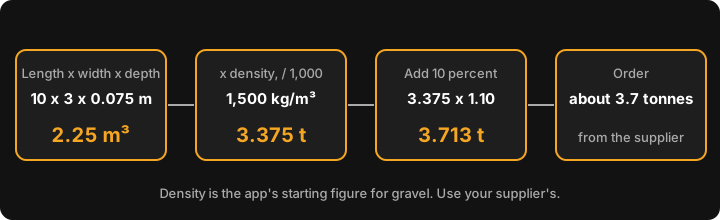
- Volume. 10 × 3 × 0.075 = 2.25 m³.
- Weight. At a density of 1,500 kg/m³: 2.25 × 1,500 ÷ 1,000 = 3.375 tonnes.
- Allowance. Add 10 percent for spillage, uneven ground and settling: 3.375 × 1.10 = 3.7125, which MeisterCalc shows as 3.713 t.
- Order. About 3.7 tonnes. Suppliers sell by the tonne or by the load, so ask what the nearest load size is.
How many tonnes in a cubic metre of gravel, soil or sand?
It depends, and any page that gives one flat number for each is hiding a range. Three things move it:
- Moisture. Wet sand and soil carry water in the gaps between grains, so the same cubic metre weighs more after rain than from a dry stockpile.
- Compaction. Loose material off the truck has air in it. Once it is spread and compacted, the same weight takes up less space. To fill a cubic metre of compacted depth you need more than a cubic metre of loose material.
- What the material actually is. Gravel, crusher dust, road base, sand and topsoil are names for different mixes of particle sizes and rock types, and each quarry's product differs.
This page doesn't carry a density table, on purpose. Densities vary by product and supplier, and a figure copied from a converter site would only look authoritative. Ask the supplier for the density of the exact product, and whether it is a loose, stockpile or compacted figure. Many publish it on the product page or will tell you when you ring.
What density should I use for gravel, soil and asphalt?
Use the supplier's. If you need a placeholder to get a rough idea, MeisterCalc's calculators start at these values, which you can overwrite:
| Calculator | Density it starts at | 1 m³ comes to |
|---|---|---|
| Gravel | 1,500 kg/m³ | 1.5 t |
| Soil | 1,200 kg/m³ | 1.2 t |
| Asphalt | 2,400 kg/m³ | 2.4 t |
The last column is 1 × density ÷ 1,000: 1 × 1,500 ÷ 1,000 = 1.5 t, 1 × 1,200 ÷ 1,000 = 1.2 t and 1 × 2,400 ÷ 1,000 = 2.4 t. These are the app's own starting values, not figures from a standard or a quarry. Sand, road base, crusher dust and other bulk materials have no preset: pick any of the three bulk calculators and type your supplier's density into the field.
How much the density matters is easy to see. Say a supplier quotes 1,400 kg/m³ for a gravel (a made-up figure, for illustration). On the 2.25 m³ job above that is 2.25 × 1,400 ÷ 1,000 = 3.15 t, not 3.375 t, so leaving the app's 1,500 in place would over-order by about 7 percent (3.375 ÷ 3.15 = 1.071).
How do I convert tonnes to cubic metres?
Turn the formula round: m³ = tonnes × 1,000 ÷ density (kg/m³). If the supplier says a load is 6 tonnes and the density is 1,500 kg/m³, that is 6 × 1,000 ÷ 1,500 = 4 m³. Check the result against the space you have to fill: at 75 mm deep, 4 m³ covers 4 ÷ 0.075 = 53.3 m², about 53 m².
How much should I order?
Add an allowance on top of the calculated weight. MeisterCalc adds a fixed 10 percent and shows it as Order (+10%). That is the app's rule of thumb, not a standard. Soft ground, a deep base, or a base that will be compacted in layers can all call for more, so talk to the supplier. For the full job, not just the conversion, see how much gravel you need, how much soil, how much asphalt and how much road base.
Doing it in MeisterCalc
- Open MeisterCalc and tap Gravel, Soil or Asphalt on the home screen. They are the same calculator with a different starting density.
- Enter Length, Width and Depth. Millimetres are the default; switch to feet and inches under Settings ▸ Units ▸ Default units.
- Change the Density field (kg/m³) to your supplier's figure.
- Read the result card: Volume in m³, Weight in tonnes, and Order (+10%) in tonnes.
- Optionally add a price per tonne for a cost estimate, or share the result with Share as Text or Share as PDF.
The 10 m × 3 m × 75 mm example, at 1,500 kg/m³, gives Volume 2.250 m³, Weight 3.375 t and Order (+10%) 3.713 t.
What the calculators don't do
- The density field accepts 100 to 5,000 kg/m³. Anything outside that shows an error.
- There is no moisture or compaction setting. Put the right figure in the density field instead.
- The Order (+10%) line is fixed at 10 percent. The Wastage slider (0 to 30 percent) appears only once you enter a price per tonne, and it changes the cost figure, not the Order tonnage.
- There is no tonnes-to-cubic-metres mode; use the formula above.
- It doesn't know your supplier's densities and doesn't supply material specifications.
Try it
Concrete, Stairs and Check Square are the free calculators. Gravel, Soil and Asphalt are among the other twelve, which unlock with a weekly subscription that starts with a 3-day free trial, or with a one-time lifetime unlock; Google Play shows the prices in your currency. Calculations work offline, on Android 7.0 or later. There's no iPhone version yet; you can join the iOS waitlist.
Sources
- NIST Guide to the SI, Appendix B.8: tonne = 1,000 kg. Checked on 28 October 2026.