How much gravel do I need (in tonnes)?
Published · Updated · By Sai Nath
Multiply length × width × depth, all in metres, to get cubic metres. Then multiply by the gravel's density in kg/m³ and divide by 1,000 to get tonnes. A 10 m × 3 m area at 75 mm deep is 2.25 m³, which is 3.375 tonnes at 1,500 kg/m³. Order about 10 percent more, so roughly 3.7 tonnes.
How do I work out how much gravel I need?
- Measure the area. Length × width in metres. For an odd shape, split it into rectangles and add them.
- Decide the finished depth. Use the depth after compaction, in metres: 75 mm is 0.075 m.
- Find the volume. Area × depth = cubic metres.
- Convert to tonnes. Cubic metres × density (kg/m³) ÷ 1,000. One tonne is 1,000 kg (NIST SP 811, Appendix B.8; checked on 28 October 2026).
- Add an allowance. Ten percent is a common rule of thumb for spillage, uneven ground and settling. It is not a standard.
A worked example: 10 m × 3 m at 75 mm
Volume: 10 × 3 × 0.075 = 2.25 m³. Weight at 1,500 kg/m³: 2.25 × 1,500 ÷ 1,000 = 3.375 t. With 10 percent on top: 3.375 × 1.10 = 3.7125, which MeisterCalc shows as 3.713 t. Ring the supplier with "about 3.7 tonnes" and ask how they load and price it.
The 1,500 kg/m³ is the figure the Gravel calculator starts at. It is not from a standard or a quarry. Read on for why that matters.
How much gravel do I need per square metre?
Per square metre, the tonnes depend only on depth and density: tonnes per m² = depth in metres × density ÷ 1,000. At 1,500 kg/m³ (the app's starting figure, used here only to show the arithmetic):
| Compacted depth | Tonnes per m² | m² covered by 1 tonne | 10 m² needs |
|---|---|---|---|
| 50 mm | 0.075 t | 13.3 m² | 0.75 t |
| 75 mm | 0.1125 t | 8.9 m² | 1.125 t |
| 100 mm | 0.15 t | 6.7 m² | 1.5 t |
Worked sums for the 75 mm row: 0.075 × 1,500 ÷ 1,000 = 0.1125 t per m²; 1 ÷ 0.1125 = 8.9 m² per tonne; 10 × 0.1125 = 1.125 t for 10 m². If your supplier's density is 1,400, scale the figures by 1,400 ÷ 1,500. If it is 1,800, scale up by 1,800 ÷ 1,500, which is 20 percent more tonnes. At 75 mm that is 0.075 × 1,400 ÷ 1,000 = 0.105 t per m² for 1,400, and 0.075 × 1,800 ÷ 1,000 = 0.135 t per m² for 1,800. Both numbers here are made up to show the effect.
Why does the density matter so much?
Because tonnes are what you pay for and what the truck carries, while the job is measured in volume. Gravel is a family of products, from rounded river stones to crushed rock, and a cubic metre of each weighs something different. Moisture and compaction change it again: a loose, damp load off the truck does not weigh what the same volume does once it is compacted. Supplier figures differ by product and quarry, so this page gives no density table. Ask your supplier for the tonnes per cubic metre of the exact product, and whether the figure is loose or compacted. The full conversion, with tonnes back to cubic metres, is in cubic metres to tonnes.
How many tonnes of gravel do I need for a driveway?
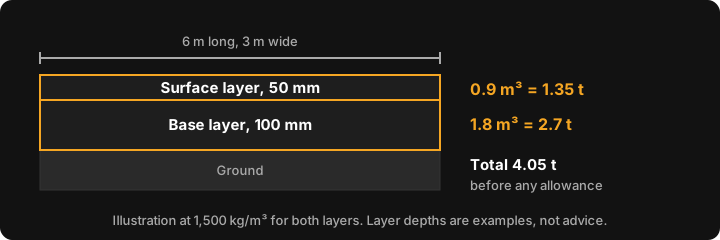
A driveway is usually two layers, a coarser base and a finer surface, each worked out the same way and then added. Here is a 6 m × 3 m drive, with a 100 mm base and a 50 mm surface. Those depths are only for the arithmetic. There is no cited supplier or council guidance on this page for driveway depths, so check what your supplier or local council wants.
- Area: 6 × 3 = 18 m².
- Base: 18 × 0.100 = 1.8 m³, so 2.7 t at 1,500 kg/m³.
- Surface: 18 × 0.050 = 0.9 m³, so 1.35 t.
- Total: 4.05 t. Add 10 percent for about 4.5 t.
Base material is often sold as road base rather than gravel; the same method applies, as set out in how much road base you need. If the drive is on a slope, driveway gradient covers how steep is steep.
How deep should a gravel driveway be?
This page doesn't state a depth, because none can be sourced here. Depth depends on the ground, the traffic and the product, and it is set by your supplier's advice or your local council's requirements. Get the figure from them in writing, then use the method above. If you are unsure, ask what they recommend for the base and for the surface, compacted.
Why order more than the calculated figure?
Edges are never perfectly level, the subgrade soaks some up, and loose gravel loses volume when it is compacted. An allowance of about 10 percent covers the usual shortfall. MeisterCalc builds in the same 10 percent as Order (+10%). It is the app's rule of thumb, so go higher for soft ground or a deep, compacted base.
Doing it in MeisterCalc
- Open MeisterCalc and tap Gravel on the home screen (Home ▸ Gravel).
- Enter Length, Width and Depth. Millimetres are the default; feet and inches are under Settings ▸ Units ▸ Default units.
- Change Density (kg/m³) from 1,500 to your supplier's figure.
- Read Volume (m³), Weight (t) and Order (+10%) (t).
- Optional: enter a Price per tonne. A wastage slider then appears, from 0 to 30 percent, starting at 10, with Total Cost and Cost + N% Waste rows. Use Share results for text or PDF.
For the 10 m × 3 m × 75 mm example the card reads Volume 2.250 m³, Weight 3.375 t and Order (+10%) 3.713 t. For a different material, such as road base or crusher dust, there is no preset: type that product's density into the same field.
What the calculator doesn't do
- No compaction or moisture setting. Put the right density in instead.
- No preset depths for paths, beds or driveways, and no tonnes-to-cubic-metres mode.
- Density must be between 100 and 5,000 kg/m³.
- It does not know your supplier's densities, and it does not tell you what your site needs. Your supplier and local council do.
Concrete, not gravel, is the one to reach for when you are pouring: see the concrete calculator in m³.
Try it
Concrete, Stairs and Check Square are the free calculators. Gravel is among the other twelve, which unlock with a weekly subscription that starts with a 3-day free trial, or with a one-time lifetime unlock; Google Play shows the prices in your currency. Calculations work offline, on Android 7.0 or later. There's no iPhone version yet; you can join the iOS waitlist.
Sources
- NIST Guide to the SI, Appendix B.8: tonne = 1,000 kg. Checked on 28 October 2026.