How many fence panels do I need for a run?
Published · Updated · By Sai Nath
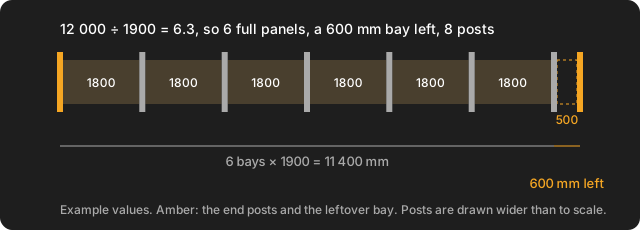
Divide the run by one panel plus one post, and round down to whole panels. A 12 000 mm run, measured post centre to post centre, with 1800 mm panels and 100 mm posts is 12 000 ÷ 1900 = 6.3: six full panels and a 600 mm bay to fill. Posts are panels plus one.
The sizes here are example values, not standards: use the width of the panels you are buying and the post you are using. Every figure was worked by hand and matches the formulas in MeisterCalc's Equal Spacings calculator. This page covers a straight, level run of ready-made panels between posts. It gives no legal height, post depth or maximum spacing, because those come from the panel maker, your council and the local rules.
How do I work out how many fence panels I need?
- Measure the run. Decide where the first and last posts go, and measure post centre to post centre. (Other ways of measuring are in the table below.)
- Find one bay. Bay = panel width + post width. For an 1800 mm panel and a 100 mm post, that is 1900 mm.
- Divide and round down. Panels = run ÷ bay, whole number only. 12 000 ÷ 1900 = 6.32, so 6 full panels.
- Add one post. Posts = panels + 1, so 7 posts for 6 panels.
- Work out what is left. Leftover = run − (panels × bay) = 12 000 − 11 400 = 600 mm. If it is zero, you are done. If not, see the section on the short bay.
Round down, not up: a panel is a fixed width, so a seventh full panel will not fit in 600 mm. The remainder is a short bay, and you decide how to fill it.
Why is the bay wider than the panel?
Because each panel sits between two posts, and the post takes up room too. Dividing a run by the panel width alone gives too many panels. Using the same example, 12 000 ÷ 1800 = 6.67, which looks like it rounds to 7, but seven panels need 7 × 1900 = 13 300 mm. The post width is easy to forget and it adds up: on a long run it is a whole panel's worth.
Which way should I measure the run?
The formula depends on where your tape starts and stops. Three common ways, with 1800 mm panels and 100 mm posts and six panels:
| You measured | Panels | Length for 6 panels |
|---|---|---|
| Centre of first post to centre of last | run ÷ (panel + post) | 6 × 1900 = 11 400 mm |
| Outside face of first post to outside face of last | (run − post) ÷ (panel + post) | 6 × 1800 + 7 × 100 = 11 500 mm |
| Inside face of first post to inside face of last | (run + post) ÷ (panel + post) | 6 × 1800 + 5 × 100 = 11 300 mm |
Use one method all the way through. The difference between them is a single post width, 100 mm here, which is enough to turn a fit into a short panel. If your run is 11 500 mm outside to outside, it takes exactly 6 panels.
How many posts for 1 to 10 panels?
On a straight run, posts = panels + 1, because both ends need one. With 1800 mm panels and 100 mm posts:
| Panels | Posts | Centre to centre | Outside to outside |
|---|---|---|---|
| 1 | 2 | 1900 mm | 2000 mm |
| 2 | 3 | 3800 mm | 3900 mm |
| 3 | 4 | 5700 mm | 5800 mm |
| 4 | 5 | 7600 mm | 7700 mm |
| 5 | 6 | 9500 mm | 9600 mm |
| 6 | 7 | 11 400 mm | 11 500 mm |
| 7 | 8 | 13 300 mm | 13 400 mm |
| 8 | 9 | 15 200 mm | 15 300 mm |
| 9 | 10 | 17 100 mm | 17 200 mm |
| 10 | 11 | 19 000 mm | 19 100 mm |
So 10 panels need 11 posts, and 5 panels need 6. The most common slip is ordering as many posts as panels. For post spacing on fences that are not fixed panels, see how many fence posts you need and how far apart.
How many fence panels for 100 feet?
The sum is the same in feet if you keep one unit. Take 6 ft panels and 4 in posts, so one bay is 72 + 4 = 76 in. A 100 ft run is 1200 in, and 1200 ÷ 76 = 15.8:
- 15 full panels, using 15 × 76 = 1140 in (95 ft).
- 5 ft left (60 in), centre to centre.
- 16 posts for the 15 panels, or 17 once a 16th, short, panel goes in.
What do I do about the leftover bay?
Almost no run is a whole number of panels. Your options, each with the 12 m example (600 mm left):
- Cut one panel to fit. The 600 mm bay is centre to centre, so the gap between the posts is 600 − 100 = 500 mm. A seventh, cut panel makes 7 panels and 8 posts. Cutting suits some panel types and not others, and a cut edge may need sealing: check the maker's instructions.
- Share it across every bay. Make all bays equal, with panels cut or posts set so the bays divide the run evenly. With 7 bays, 12 000 ÷ 7 = 1714.3 mm each, so every panel is trimmed from 1800 to 1614.3 mm. With 6 bays, each bay would be 2000 mm, 100 mm wider than the panel, which is a gap you would then have to fill.
- Move a post. If the layout is yours to change, shift the end post in by the 600 mm so 6 panels fit exactly, or out the other way to 7 whole panels (13 300 mm).
- Use a different panel size where the maker sells one, so the run divides evenly.
A small remainder is easier. In an 11 500 mm run (centre to centre) the six panels use 11 400 mm and 100 mm is left. Spread over 6 bays that is about 16.7 mm per bay, a little extra space at each post that the maker's instructions may or may not allow.
Cutting, trimming and gaps depend on the material, so there is no one rule here. Ask the panel maker what they allow. The method to divide a length evenly is in how to divide a length into equal spaces, and the same sum for deck posts is in how to space deck posts.
How do I use MeisterCalc to check it?
MeisterCalc has no fence calculator, but Equal Spacings does the dividing for you, once you give it the bay as the target.
- Open MeisterCalc and tap Equal Spacings on the home screen.
- Enter Overall Length (12000, post centre to centre) and Target Spacing (1900, which is the panel plus one post).
- Read Number of Spaces (6), Actual Spacing (2000 mm) and Pieces Needed (7).
- Compare Actual Spacing to your bay. Here 2000 is 100 mm over 1900, so six panels do not fill the run exactly; the 600 mm leftover is 6 × 100 mm.
The catch is that Equal Spacings rounds to the nearest whole number of spaces, not down, and it spaces them evenly. It does not know your panel or post width and it does not report a leftover. Enter 12 500 instead and 12 500 ÷ 1900 = 6.58 rounds up to 7 spaces: Actual Spacing is 1785.7 mm, shorter than your 1900 mm bay, so each of seven panels would be trimmed by 114.3 mm. So when Actual Spacing is over your bay, the panels will not fit; when it is under, they need trimming by the difference. Pieces Needed is the post count for that layout. The target must be more than 0 and less than the overall length. The app's help says to measure centre to centre or inside face to inside face, so pick one and keep to it. Equal Spacings is not one of the three free calculators.
How much concrete do I need for the post holes?
Count the posts first. The 12 m example with its infill panel has 8 posts. A 300 mm wide hole, 800 mm deep, is π × 0.15² × 0.8 = 0.0565 m³, so 8 holes are 0.4524 m³, or 0.4976 m³ with 10% extra. Those are example sizes: the hole size and depth are the maker's or an engineer's call. The whole hole is counted as concrete, so the real figure is a little lower. Open the free Concrete calculator and switch to Holes (next to Slab) for your own numbers, and see how much concrete you need for post holes for bags.
What changes with corners, gates and slopes?
The count above is for a straight, level run. A corner shares a post between two runs, so it saves one. A gate has its own posts, usually stronger ones, and an opening width set by the gate, not by the panels. A fence on a slope is measured along each step or run, and stepped or racked panels are set by the maker's instructions. Count each straight section on its own, then add the extras. Height, boundary and dividing fence rules vary by state, council and country, so check them with your council before you buy. MeisterCalc has no corner, gate or slope option.
What does this page not cover?
- Panel sizes: use the width printed on the panel you are buying, as sizes vary by maker and country.
- Post size, post depth, bracing, rails and capping.
- Pickets built on rails, covered in picket fence spacing, and stock or wire fencing.
- Legal height, boundary and approval rules.
Try it
Concrete, Stairs and Check Square are the free calculators; the other 12, Equal Spacings included, unlock with a weekly subscription that starts with a 3-day free trial, or with a one-time lifetime unlock, and Google Play shows the prices in your currency. It works offline on Android 7.0 or later. There's no iPhone version yet; you can join the iOS waitlist.