How do you space deck posts evenly?
Published · Updated · By Sai Nath
Measure from the centre of the first post to the centre of the last. Divide that length by the maximum spacing your designer, span table or railing maker allows, and round the answer up to a whole number of bays. Divide the length by that number to get one equal bay. You need one more post than you have bays.
Checked on 28 October 2026: the sums on this page were worked by hand and match the formulas behind MeisterCalc's Equal Spacings calculator. This page gives the method, not a maximum spacing. The maximum depends on the deck and the job, so none is printed here. The 1800 mm used below is an example number only.
First, which posts are you spacing?
A deck has two different sets of posts, and they follow different rules. Mixing them up is the most common mistake.
- Structural posts hold up the frame: the posts or stumps under the bearers. Their maximum spacing comes from the deck's design, the span tables for your timber and loads, or an engineer. In Australia the span tables sit behind the National Construction Code (NCC) and its referenced timber framing standard; the NCC is published online by the Australian Building Codes Board.
- Railing or balustrade posts carry the barrier around the edge. Their spacing comes from the railing maker's installation guide, which is tied to the loads the barrier must resist. The rules for barriers are in the building code: for Australian houses, NCC Housing Provisions Part 11.3, Barriers and handrails. In England, Approved Document K covers guarding.
Checked on 28 October 2026: those pages are the official sources for the rules. Read the figure for your case there, or from your plans, and treat it as a maximum. Everything below turns that maximum into a layout. For a NZ job, the building rules are in the NZ Building Code and its Approved Documents, and the council has the final say.
How do you space deck posts evenly, step by step?
- Get the maximum spacing for these posts from the plans, span table or maker. Write it down in millimetres.
- Measure the length from centre to centre. Take it from the centre of the first post to the centre of the last, along the edge. If the end posts are not fixed yet, mark their centres first.
- Divide the length by the maximum. The result is rarely a whole number.
- Round up. Always up, never to the nearest. Rounding up makes the bays slightly shorter than the maximum, which is allowed. Rounding down makes them longer, which is not.
- Divide the length by the whole number of bays. That is your equal bay, centre to centre.
- Add one. Posts = bays + 1. Four bays need five posts, because both ends have a post.
- Mark from one end. Step off one bay at a time, then check that the last mark lands on the centre of the end post. If it misses by more than a few millimetres, the adding-up has slipped somewhere. Re-measure rather than squeezing the last bay.
Worked example: a 6.5 m deck edge
Say the maximum is 1800 mm and the deck edge measures 6500 mm from the centre of the first post to the centre of the last.
- 6500 ÷ 1800 = 3.61.
- Round up to 4 bays.
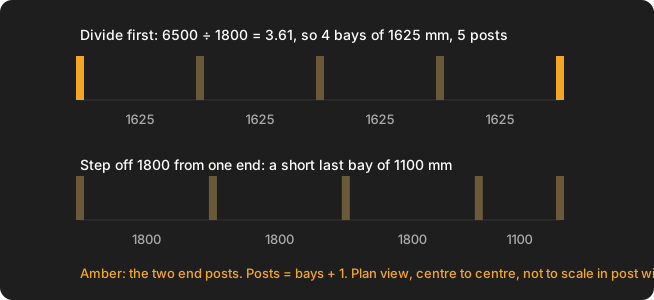
- 6500 ÷ 4 = 1625 mm per bay.
- Posts = 4 + 1 = 5, at 0, 1625, 3250, 4875 and 6500 mm from the first post.
For an edge that divides cleanly, 7200 mm at the same 1800 mm maximum gives 7200 ÷ 1800 = 4 bays of 1800 mm exactly, and 5 posts. No rounding is needed, but the bays sit right on the limit, so leave room if your plans say “less than” rather than “up to”.
Why equal bays instead of stepping off the maximum?
You could mark 1800 mm from one end and see what is left. On the 6.5 m edge that gives three bays of 1800 and a last bay of 1100. It passes the maximum, but it looks uneven, and the rail, the decking pattern and any balusters between the posts no longer line up. Dividing the length first spreads the difference over every bay, so they all match.
How far apart should deck posts be?
As far apart as your designer, span table or railing maker allows, and no further. There is no single figure for every deck: it depends on the timber or steel, the size of the bearers, the load, the height off the ground and the local rules. This page does not state a universal number for that reason. If you are building without plans, ask your local council or a builder or engineer for the maximum for your case, and use the method above to lay it out.
How do you space deck railing posts evenly?
Use the same divide. Take the maker's maximum post spacing as the limit, round the number of bays up, and divide the edge into equal bays. Then check two things the structural posts do not have:
- The barrier rules set a maximum gap between balusters, and the balusters have to fit evenly in every bay. Work that out after the posts. For the gap itself see balustrade gaps in Australia.
- Railing posts often fix to the deck frame or to the edge of the decking, so their positions may be pinned by where the joists and bearers are. Check that your equal bays can reach solid fixing.
How do you calculate the spacing between posts?
The spacing is the length divided by the number of bays. Written out: number of bays = round up (length ÷ maximum spacing), bay = length ÷ number of bays, posts = bays + 1. Measure to the post centres, because that is what the maximum refers to. If a plan gives clear gaps between post faces instead, add the post width to each gap to get the centre-to-centre figure: a 1700 mm clear gap between 100 mm posts is 1700 + 100 = 1800 mm centre to centre.
The same method works for fence posts: see how many fence posts you need. For the dividing sum on its own, with any kind of mark, see how to divide a length into equal spaces.
Doing it in MeisterCalc
Equal Spacings does the divide and shows the bays on a live diagram. It rounds to the nearest whole number of spaces, not up, so you have to round up yourself where there is a maximum.
- Open MeisterCalc and tap Equal Spacings on the home screen.
- Enter the Overall Length: for posts, the centre-to-centre length.
- Enter the Target Spacing.
- Read Number of Spaces, Actual Spacing and Pieces Needed. Pieces Needed is the number of posts.
- Check the Actual Spacing against your maximum. If it is over, type a smaller Target Spacing until it is under.
An example where this matters: a 7900 mm edge with a 1800 mm maximum. 7900 ÷ 1800 = 4.39. Entering 1800 as the target rounds to 4 spaces, so Actual Spacing is 1975 mm, over the limit. Rounding up by hand gives 5 bays, 7900 ÷ 5 = 1580 mm and 6 posts. Enter 1580 as the Target Spacing and the app returns 5 spaces, 1580 mm, 6 posts.
Everything is in millimetres by default. For feet and inches, go to Settings ▸ Units ▸ Default units ▸ Imperial (ft/in).
Common mistakes
- Posts = bays. You need one more post than bays. Four bays need five posts.
- Rounding down. 6500 ÷ 1800 = 3.61 does not become 3 bays: 6500 ÷ 3 = 2167 mm, over the maximum. Round up to 4.
- Stepping off a fixed distance and leaving a short last bay.
- Measuring to the post face or the outside of the frame when the maximum is centre to centre.
- Using the structural figure for the railing, or the other way round. They come from different sources.
What MeisterCalc doesn't do
- It does not know a maximum span, a footing size or a railing load. You supply the maximum from the plans, span table or maker, and the building rules are set by the NCC, the NZ Building Code or Approved Documents, and your local council, not by the app.
- It rounds to nearest, not up, so a hard maximum needs the round-up worked by hand as above.
- It lays out a straight run. For corners or stairs, work out each straight run on its own.
Try it
Equal Spacings is one of the paid calculators: Concrete, Stairs and Check Square are the three free ones, and the other 12 unlock with a weekly subscription that starts with a 3-day free trial, or with a one-time lifetime unlock. Google Play shows the prices in your currency. It works offline on Android 7.0 or later. There is no iPhone version yet; you can join the iOS waitlist.