Is there an equal spacing calculator app for posts, studs and pickets?
Published · Updated · By Sai Nath
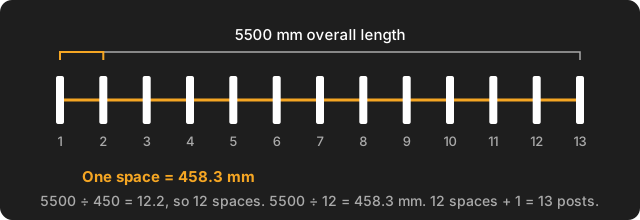
Yes. MeisterCalc, an Android app, has an Equal Spacings calculator: enter the overall length and a target spacing, and it gives the number of spaces, the actual spacing and the pieces needed (spaces plus one). A 5500 mm run at about 450 mm gives 12 spaces of 458.3 mm and 13 posts. It works offline, in metric or feet and inches.
How does the Equal Spacings calculator work?
Spacing is measured centre to centre, so posts, pickets, brackets or marks are treated as points on a line. Three inputs and outputs do the job:
- Number of Spaces = the overall length ÷ your target spacing, rounded to the nearest whole number.
- Actual Spacing = the overall length ÷ that number of spaces.
- Pieces Needed = spaces + 1, because a run of posts has one more post than gaps.
A worked example: a 5500 mm fence run, with posts about 450 mm apart for a picket panel layout.
- 5500 ÷ 450 = 12.2, which rounds to 12 spaces.
- 5500 ÷ 12 = 458.3 mm between each point.
- 12 spaces + 1 = 13 posts.
The calculator rounds to the nearest count, not up. So the actual spacing can end up a little larger than your target, as 458.3 mm is larger than 450 mm here, or a little smaller: 3000 mm at a 450 mm target gives 7 spaces of 428.6 mm. If a gap must never go over a limit, use Baluster Spacing instead (below).
Measure the overall length the way your layout works: post centre to post centre, or inside face to inside face. It must be longer than the target spacing, or the calculator shows no result. The in-app help lists common targets of 450, 600, 1800 and 2400 mm in metric, and 16 in, 24 in, 6 ft and 8 ft in imperial. Those are the help's own separate lists, not conversions of each other: 450 mm is 17.7 in.
Which tool do I use: Equal Spacings, Running Measurements or Baluster Spacing?
They answer three different layout questions. Pick by what is fixed.
| Tool | Use it when | You enter | Example |
|---|---|---|---|
| Equal Spacings | Every gap should be the same, close to a target. Posts, brackets, marks. | Overall Length, Target Spacing | 5500 and 450 mm: 12 spaces, 458.3 mm, 13 posts |
| Running Measurements | The interval is fixed and you work from a start offset. Studs, joists. | Start, Interval, Number of Marks | Start 38, interval 450: marks at 488, 938, 1388 mm |
| Baluster Spacing | The items have width and each gap must stay under a maximum. | Run, Baluster Width, Max Spacing | 3000 run, 42 wide, 125 max: 23 balusters, 84.75 mm gaps |
Running Measurements leaves whatever is left over in the last gap, because it never changes the interval. That suits studs, where 450 or 600 mm centres are the point; our guide to marking out studs and the broader framing calculator app page cover that side. Baluster Spacing is the one to use when the items have thickness; see the baluster spacing app page. For the arithmetic done by hand, read how to divide a length into equal spaces.
The two other rows, worked by hand. Running Measurements: mark n = start + n × interval, so 38 + 450 = 488, 38 + 2 × 450 = 938 and 38 + 3 × 450 = 1388 mm. Baluster Spacing: balusters = ⌈3000 ÷ 125⌉ − 1 = 24 − 1 = 23, and each gap = (3000 − 23 × 42) ÷ (23 + 1) = 2034 ÷ 24 = 84.75 mm.
How many posts do I need for a given number of spaces?
One more than the number of spaces. Ten spaces need 11 posts; 12 spaces need 13. This is the fence post error, and Pieces Needed in the app already adds the extra one. For deck posts and fence lines, see how to space deck posts and fence post spacing.
Is the equal spacing calculator free, and does it work in inches?
Equal Spacings is not one of the free calculators. Concrete, Stairs and Check Square are free; the other 12, including Equal Spacings, unlock with a weekly subscription that starts with a 3-day free trial, or with a one-time lifetime unlock. Google Play shows the prices in your currency, so none are quoted here.
Everything defaults to millimetres. For feet, inches and sixteenths, go to Settings ▸ Units ▸ Default units ▸ Imperial (ft/in) and every calculator switches over.
Doing it in MeisterCalc
- Open MeisterCalc and tap Equal Spacings on the home screen (or search for "spacing" or "post").
- Enter the Overall Length and the Target Spacing. The diagram updates as you type.
- Read Number of Spaces, Actual Spacing and Pieces Needed.
- To send the numbers on, tap the share icon and choose Share as Text or Share as PDF.
What it doesn't do
- Equal Spacings has no item width. It treats posts as points, so for thick items use Baluster Spacing.
- It rounds to the nearest count, so it won't promise that no gap exceeds your target.
- It doesn't give a mark-out table. Running Measurements and Baluster Spacing do.
- It doesn't know building rules. Maximum post and stud spacings, and any gap limits, are set by the NCC, NZ Building Code or Approved Documents and your local council, not by the app.
- It is Android only, on Android 7.0 or later, and the interface is in English. There is no iPhone version yet; you can join the iOS waitlist.
Get it
The calculators run offline, so no signal is needed on site. The app connects to the internet only for purchases, product analytics and crash reports.