Concrete in MeisterCalc: slabs, strip footings and post holes
Published · Updated · By Sai Nath
Concrete is one of three free calculators in MeisterCalc for Android. Slab, Strip Footing and Holes each give the volume plus 10% to order: a 4000 × 3000 × 100 mm slab is Volume 1.200 m³ (1200.0 L) and Order (+10%) 1.320 m³. In feet and inches it adds cubic yards and 80, 60 and 40 lb bags.
Try it free on the web: Concrete calculator, in your browser with nothing to install.
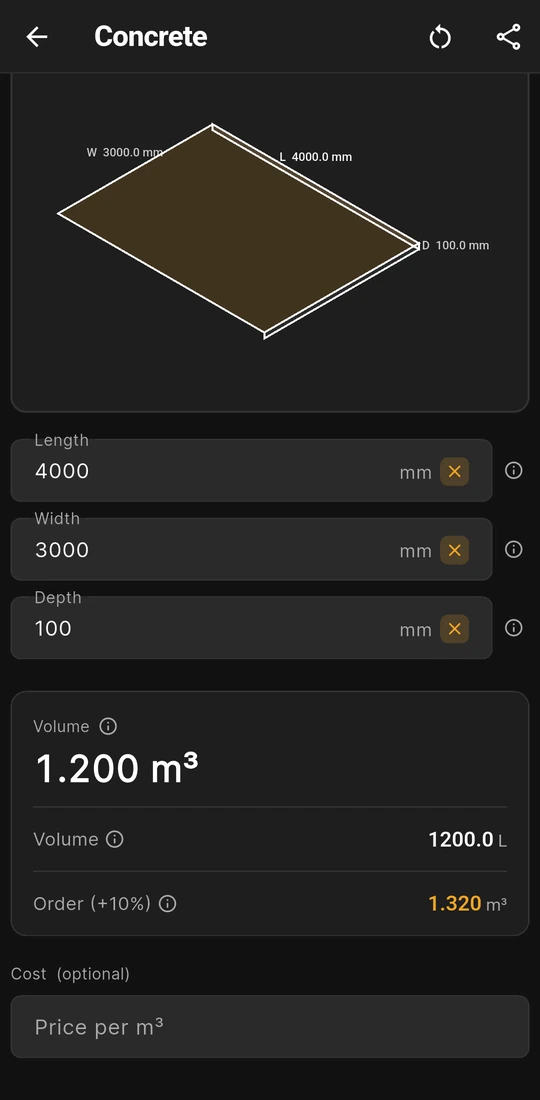
Slab: 4000 × 3000 × 100 mm is 1.200 m³
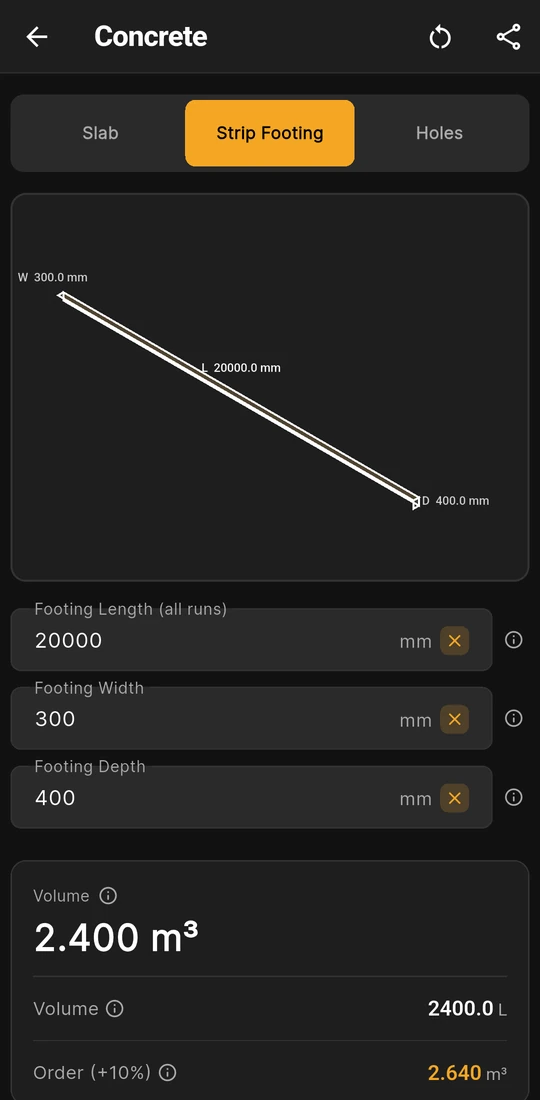
Strip Footing: 20 m at 300 × 400 mm is 2.400 m³
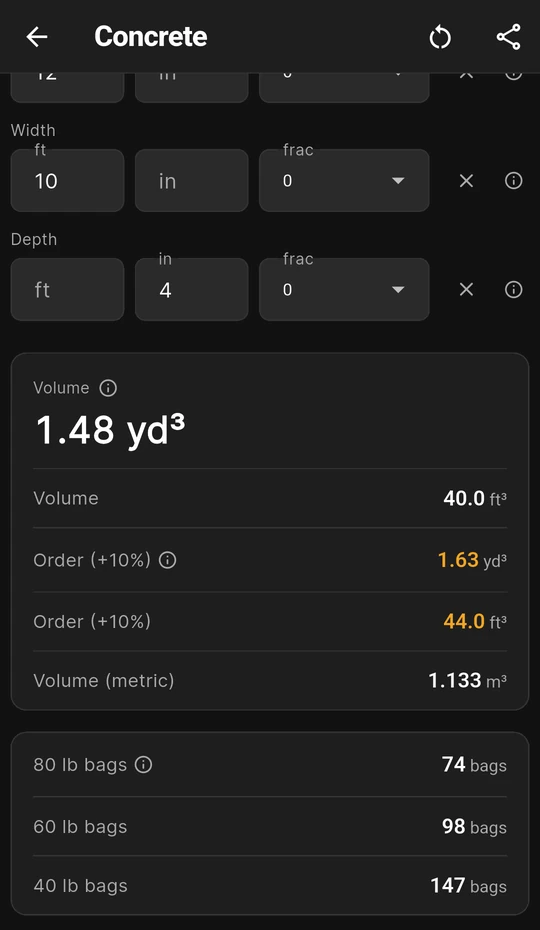
12 × 10 ft, 4 in thick: 1.48 yd³ and 74 × 80 lb bags


Slab, Strip Footing and Holes: what each mode takes and gives
Open Home ▸ Concrete and pick a mode on the bar at the top. Each mode keeps its own sizes, and the results appear as soon as every field has a number.
| Mode | You enter | Results in metric | Use it for |
|---|---|---|---|
| Slab | Length, Width and Depth | Volume in m³, Volume in litres, Order (+10%) in m³ | Slabs, paths, pads and shed bases. |
| Strip Footing | Footing Length (all runs), Footing Width and Footing Depth | The same three rows | Trench footings, every run added into one length. |
| Holes | Diameter, Depth and Number of Holes | Per Hole, Total and Order (+10%), in m³ to four decimal places | Post holes and round piers of one size. |
Strip Footing runs the slab sum under its own labels. The ⓘ note on Footing Length says to measure each run along the centre line of the trench, so no corner is counted twice. In Holes you type the full diameter; the app halves it.
Under the results, Cost (optional) takes a Price per m³ (Price per yd³ in imperial). A Wastage slider then appears, from 0 to 30% and starting at 10%, with Total Cost, the volume times your price, and Cost + 10% Waste, which follows the slider. The slider never changes the Order (+10%) row.
Worked example: the three modes, number by number
Each figure is what the app shows. Start with a slab 4000 mm long, 3000 mm wide and 100 mm thick.
- Millimetres to metres, then multiply: 4 × 3 × 0.1 = 1.2 m³. The app shows Volume 1.200 m³.
- Litres: 1.2 × 1000 = 1200 L, shown as Volume 1200.0 L.
- Order: 1.2 × 1.10 = 1.32 m³, shown as Order (+10%) 1.320 m³.
Strip Footing. Twenty metres of footing, 300 mm wide and 400 mm deep, entered as Footing Length (all runs) 20000 mm: 20 × 0.3 × 0.4 = 2.4 m³. The card reads Volume 2.400 m³, Volume 2400.0 L and Order (+10%) 2.640 m³, as on the second screen above.
Holes. Six holes 300 mm across and 800 mm deep. The radius is 0.15 m, so one hole holds π × 0.15² × 0.8 = 0.0565 m³, six hold 0.3393 m³, and the order with 10% is 0.3732 m³. The card reads Per Hole 0.0565 m³, Total 0.3393 m³ and Order (+10%) 0.3732 m³. Holes has no litres row.
The long-hand method for each shape is in how much concrete do I need for a slab?, how much concrete do I need for strip footings? and how much concrete do I need for a post hole?
What you see on the screen
- A 3D drawing of the pour. Slab and Strip Footing draw a box with L, W and D on its edges; Holes draws one cylinder with its diameter, depth and count.
- Cubic yards and bags in feet and inches. Settings ▸ Units ▸ Default units ▸ Imperial (ft/in) turns every field into feet, inches and a fraction. The card then leads with cubic yards, adds cubic feet and a Volume (metric) or Total (metric) row, and a second card counts 80 lb bags, 60 lb bags and 40 lb bags for the order volume, rounded up. The yields, 0.60, 0.45 and 0.30 ft³ a bag, are from the QUIKRETE Concrete Mix (No. 1101) data sheet; buy one size, not all three. The third screen above is a 12 × 10 ft slab, 4 in thick: Volume 1.48 yd³ and 40.0 ft³, Order (+10%) 1.63 yd³ and 44.0 ft³, Volume (metric) 1.133 m³, and 74, 98 or 147 bags. Eight holes 12 in across and 3 ft deep come to Total 0.698 yd³ (18.85 ft³): 35, 47 or 70 bags.
- No bag count in millimetres. A 20 kg bag yields a different volume from one product to the next, so metric mode stops at cubic metres and litres. Divide the Order (+10%) figure by the yield on your bag; how many 20 kg bags of concrete make a cubic metre? lists named products.
- A note on every field. The ⓘ button beside each input and result explains it, with a small drawing.
- Share and keep. Share as Text or Share as PDF sends the mode, sizes, results and any cost; the PDF carries the drawing. Each mode remembers its last sizes, the circular arrow clears them, and switching units starts the fields fresh.
Try the concrete sums in a browser
The site's free concrete calculator runs the same sums with the same 10% and US bag yields, and adds two things the app leaves out: metric bag counts for five named products, and rebar for a slab.
Is the Concrete calculator free?
Yes. Concrete is free in MeisterCalc, along with Stairs and Check Square: all three modes, the bag counts, the cost line and sharing, with nothing blurred. The other 13 calculators need Pro, a subscription or a one-time lifetime unlock; Google Play shows the plans and prices in your currency. For other free options, see is there a free concrete calculator app for slabs and post holes?
Concrete by country: units, bags and who sets the size
The app gives a volume. The slab thickness, footing size and concrete strength come from the drawings, the engineer and the rules where you build. What the site's country guides say:
| Country | How it's bought | Bag yields quoted on this site | Sizes set under |
|---|---|---|---|
| Australia | Ready-mix by the m³; Boral says many agitator trucks carry around 6 to 8 m³ and minimum loads vary by plant | Boral Concrete Mix 20 kg: 108 bags per m³. Cement Australia PROStrength 20 kg: about 110 | NCC Housing Provisions Part 4.2: Australia, concreters |
| New Zealand | Ready-mix, or bags for deck piles | Dricon HandiCrete: about 0.010 m³ per 25 kg bag, 0.016 m³ per 40 kg bag | Building Code clause B1 and NZS 3604: New Zealand |
| United Kingdom | Ready-mix, or packs for fence posts | Heidelberg Materials 40N Concrete MaxiPack20: 0.008 m³ a pack | Approved Document A in England: United Kingdom |
| United States | Ready-mix by the cubic yard; bags by the pound | QUIKRETE Concrete Mix: 0.60 ft³ per 80 lb bag, 45 bags per cubic yard | Your plans, the frost depth and the IRC as your state adopts it: United States |
Each yield is the maker's figure for its own product; the data sheets are linked from the concrete calculator page. Your council, building consent authority, building control or certifier decides what a job needs.
Rules in more detail: NZ footings and piles (NZS 3604), US deck footings (IRC R507), and the rest of building codes by country, from Australia's NCC to New Zealand's Building Code, England's Approved Documents and the US IRC.
Questions about Concrete
Can I change the 10% on the Order row?
No. Order (+10%) is always the volume × 1.10. The Wastage slider under Cost (optional) runs from 0 to 30%, but it moves only the cost. For a different margin, multiply the Volume row yourself; how much extra concrete should I order? covers when 5% or 15% suits better.
How do I work out an L-shaped slab or a slab with an edge beam?
Split it into boxes: each rectangle in Slab, the edge beam in Strip Footing along its centre line, then add the Volumes. Each mode holds one set of sizes, so note each figure before typing the next. Calculators for concreters works a shed slab and its edge beam this way.
Does Holes take the post out of the volume?
No. Each hole is a straight cylinder of the diameter you enter, and nothing set in the concrete is subtracted, so you finish with a little over. For holes that belle out at the bottom, or a job with two hole sizes, work each group on its own and add the Totals.
Does it give the weight, the mix or the reinforcement?
No. It gives volume only: no tonnes, no mix split, no strength grade and no steel. For the weight, see how much does a cubic metre of concrete weigh?; the web calculator above does rebar for a slab.
Guides that go deeper
- How much concrete do I need for a slab?
- How much concrete do I need for strip footings?
- How much concrete do I need for a post hole?
- How many 20 kg bags of concrete make a cubic metre?
- How much extra concrete should I order?
- Which calculators do concreters need for slabs, falls and bases?
Get MeisterCalc
MeisterCalc runs on Android 7.0 or later and works every sum out on the phone, so Concrete works with no signal at the pour. It is free, with every result shown.