Feet and inches calculator app: add, subtract and convert to mm
Published · Updated · By Sai Nath
Feet & Inches in MeisterCalc adds and subtracts feet, inches and fractions, and converts to and from millimetres, centimetres or metres, rounded to 1/8, 1/16 or 1/32 inch. 5' 7 3/4" + 2' 9 1/2" is 8' 5 1/4" (2571.8 mm), and 3000 mm is 9' 10 1/8". It is new in version 1.1 and comes with Pro.
Try it free on the web: Feet and inches calculator, in your browser with nothing to install.
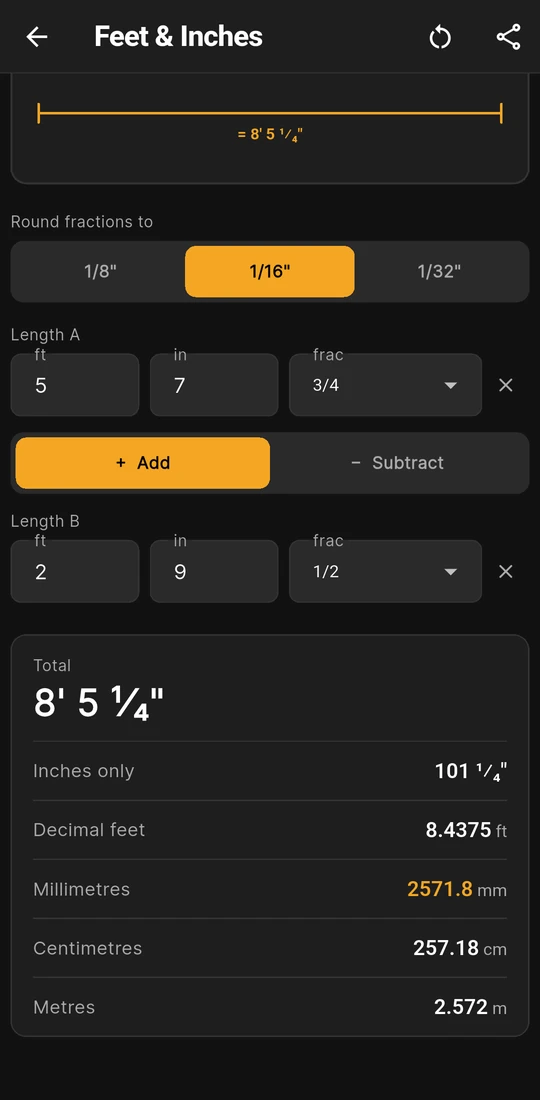
5' 7 3/4" + 2' 9 1/2" = 8' 5 1/4"
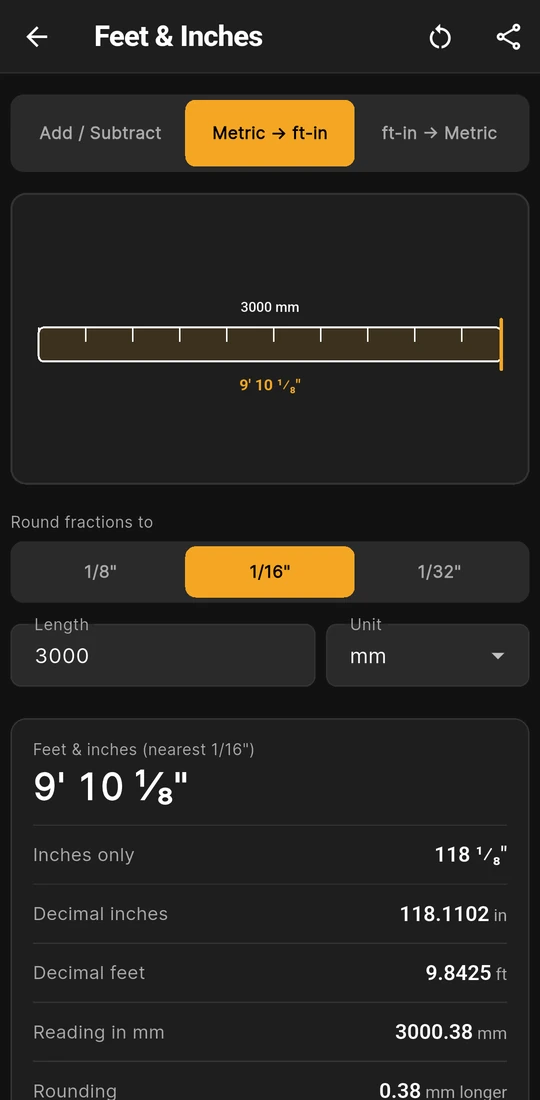
3000 mm is 9' 10 1/8", 0.38 mm longer
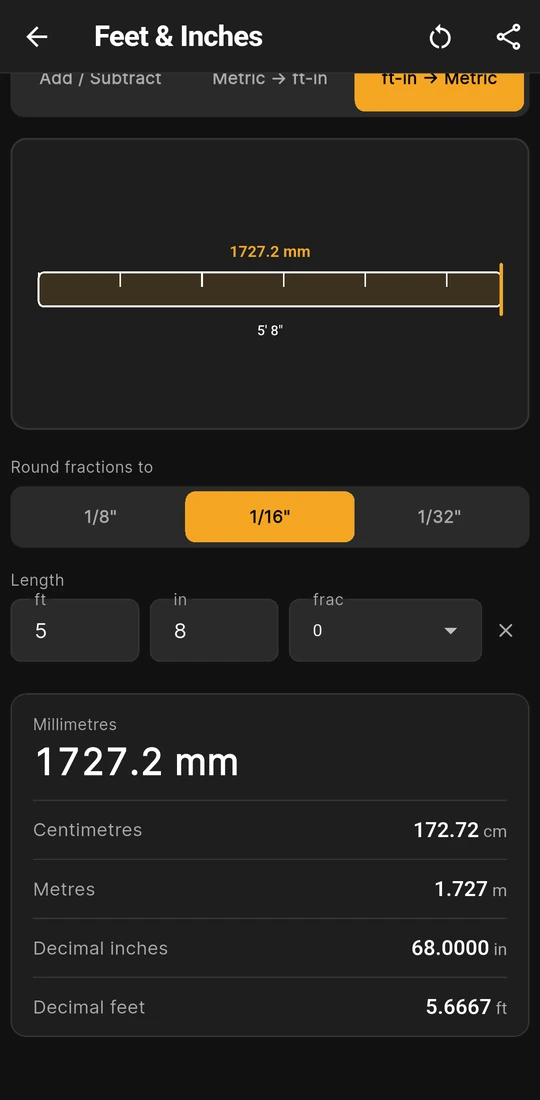
5' 8" is 1727.2 mm, or 172.72 cm


Three modes: what each one takes and gives
Feet & Inches is the calculator in MeisterCalc that does arithmetic with imperial lengths. It arrived in version 1.1 and sits last on the Home grid, or type "mm to feet" into the Home search. Pick a mode on the bar at the top.
| Mode | You enter | Results |
|---|---|---|
| Add / Subtract | Length A, then + Add or − Subtract, then Length B, each in ft, in and frac | Total (Difference when subtracting), Inches only, Decimal feet, Millimetres, Centimetres, Metres |
| Metric → ft-in | Length, with a Unit of mm, cm or m | Feet & inches (nearest 1/16"), Inches only, Decimal inches, Decimal feet, Reading in mm, Rounding |
| ft-in → Metric | Length in ft, in and frac | Millimetres, Centimetres, Metres, Decimal inches, Decimal feet |
Above the inputs, Round fractions to sets 1/8", 1/16" or 1/32" for every feet-and-inches answer. It starts at the Fraction precision in Settings, 1/16" unless you've changed it, and the screen remembers what you pick. Each feet-inch length has three boxes: whole feet in ft, inches in in (whole or decimal, such as 9.5) and a fraction from the frac list. An empty box counts as 0. Millimetres show to one decimal place, centimetres to two, metres to three, and decimal inches and feet to four.
Worked example: 5' 7 3/4" plus 2' 9 1/2"
The app turns both lengths into exact inches, adds them, and rounds only the answer, so sixteenths can't pile up along the way.
- Length A: 5 × 12 + 7 + 3/4 = 67.75 in.
- Length B: 2 × 12 + 9 + 1/2 = 33.5 in.
- Add: 67.75 + 33.5 = 101.25 in, which the card shows as Inches only 101 1/4".
- Back to feet: 101.25 ÷ 12 is 8 feet with 5.25 in over, so Total 8' 5 1/4", or Decimal feet 8.4375 ft.
- Metric: 101.25 × 25.4 = 2571.75 mm, shown as Millimetres 2571.8 mm, Centimetres 257.18 cm and Metres 2.572 m.
Tap − Subtract with the shorter length first and the answer keeps a minus sign: 2' 0" − 3' 0" shows Difference -1' 0".
The conversions use the same rule. In Metric → ft-in, 3000 mm is 3000 ÷ 25.4 = 118.1102 in: 9 feet and 10.1102 in. The 0.1102 in is 1.76 sixteenths, which rounds to 2/16, so the card reads 9' 10 1/8". That rounded size is exactly 3000.375 mm, so Reading in mm shows 3000.38 mm and Rounding shows 0.38 mm longer. 180 cm comes out as 5' 10 7/8". The other way, ft-in → Metric is exact to what you typed: 7' 3 5/16" is 2217.7 mm, and 5' 8" is 1727.2 mm, or 172.72 cm.
What you see on the screen
- A drawing of the sum. Add / Subtract lays bar B on the end of bar A, forwards to add or back to subtract, with the answer bracketed underneath. The two conversions draw a tape blade with foot or inch ticks, metric above and feet and inches below.
- The rounding, spelled out. In Metric → ft-in, Reading in mm turns the rounded tape reading back into millimetres, and Rounding says whether it is longer, shorter or exact. Pick 1/32" when a sixteenth is too coarse.
- Either unit setting. The screen always takes feet and inches, whether Settings ▸ Units ▸ Default units is Metric (mm) or Imperial (ft/in). With Imperial set, Fraction display chooses whether answers read 1/4 or in small raised and lowered figures.
- Minus signs where they make sense. A feet-inch input can't be negative, but the metric Length can, and the answer keeps its sign. A length over 1000 km gets a red note instead of a result.
- It remembers, clears and shares. The mode, the rounding and your last lengths come back next time. Each feet-inch length has its own × to clear it, the circular arrow clears the screen, and Share results sends the inputs and results as text or as a PDF headed with the mode.
Try the feet and inches maths free on the web
The same three jobs run free in a browser on this site, with the app's rounding, and the page gives a code to embed the calculator on your own site.
Is Feet & Inches free?
No. Feet & Inches comes with Pro. Without Pro you can open it, type both lengths and see the drawing, but the results card stays blurred until you unlock. The web calculator above is free. In the app, Concrete, Stairs and Check Square are free, and Pro unlocks the other 13, Feet & Inches included, as a subscription or a one-time lifetime unlock; Google Play shows the plans and prices in your currency.
Where feet and inches still turn up
| Where | Why it comes up | Figures on this site |
|---|---|---|
| United States | Plans, codes and timber sizes are in feet and inches | IRC studs at 16" or 24" on centre, which is 406.4 mm and 609.6 mm, not 400 and 600: United States |
| Australia, New Zealand and the UK | Imported drawings, product sheets and older plans | A sheet sold as 2400 mm is 7' 10 1/2", about 38 mm short of 8 ft (2438.4 mm): mm to feet and inches |
| Everywhere | The inch is defined in millimetres | 1 in = 25.4 mm exactly, so 1 ft = 304.8 mm (NIST SP 811): United States |
The calculator converts and adds; it doesn't say what a size should be. Sizes and tolerances come from the drawings and the building rules where you work, and your council, building consent authority, building control or certifier has the final say.
Rules in more detail: building codes by country, from Australia's NCC to New Zealand's Building Code, England's Approved Documents and the US IRC.
Questions about Feet & Inches
Can it multiply or divide a length?
No. Add / Subtract works on two lengths at a time. To split a run into equal gaps, use Equal Spacings; to multiply or divide feet and inches in a browser, the construction calculator does both.
How close is a rounded fraction to the real length?
At 1/16" the reading can be out by up to half a sixteenth, 1/32" or 0.79 mm, either way. Switch Round fractions to 1/32" to halve that, or 1/8" for a coarser tape. In Metric → ft-in the Rounding row gives the exact figure for each length.
Do I have to set the app to Imperial to use it?
No. Feet & Inches takes feet and inches whatever Default units is set to. The setting changes the other calculators, which then take and show feet and inches but don't add lengths together.
Can I type a fraction finer than the list offers?
The frac list steps by the Fraction precision in Settings, 1/16" unless you change it. For anything finer, type decimal inches in the in box: 3.03125 is 3 1/32".
Does it work out areas or volumes?
No, lengths only: no square feet, cubic feet or board feet. For a pour in cubic yards and cubic feet, set the app to Imperial and use Concrete.
Guides that go deeper
- mm to feet and inches converter: both ways, plus feet-and-inch sums
- How do I convert millimetres to feet, inches and sixteenths?
- How do I add and convert feet and inches for building work?
- Is there a construction calculator app that works in millimetres?
Get MeisterCalc
MeisterCalc runs on Android 7.0 or later and does every conversion on the phone, so Feet & Inches works with no signal on site. Feet & Inches comes with Pro.