Is there a construction calculator that works in millimetres?
Published · Updated · By Sai Nath
Yes. MeisterCalc is a construction calculator for Android that works in millimetres by default, built for Australian, New Zealand and UK trades. Type lengths in mm and read results in mm. If you need feet, inches and fractions, switch in Settings ▸ Units ▸ Default units ▸ Imperial (ft/in). All 15 calculators follow the setting for lengths.
How do I switch between millimetres and feet and inches?
One setting changes every calculator. Millimetres are already on when you first install the app.
- Tap the Settings button (the sliders icon, top right) on the home screen.
- Under Units, find Default units.
- Choose Metric (mm) or Imperial (ft/in). The choice is saved on your phone.
- In imperial mode, two more settings appear: Fraction display (⁷⁄₁₆ or 7/16) and Fraction precision (1/8, 1/16 or 1/32; the default is 1/16).
Switching units clears what you had typed into the calculators, so screens reopen empty. Switch first, then enter your numbers.
What does a calculator show in each mode?
In metric mode you enter lengths in millimetres and results show one decimal, like 1575.0 mm. In imperial mode you enter feet, inches and a fraction, and results show feet, inches and a fraction at your chosen precision, like 5' 2" for the same 1575 mm. Underneath, the app keeps every length in millimetres and converts at the edge, using 25.4 mm to the inch.
Some results never change unit. Angles are always degrees. Volumes are cubic metres (and litres for a concrete slab), weights are tonnes and decking is lineal metres, in either mode. The Dumpy Level takes its readings in metres in both modes, the way levels are usually booked.
Which of the 15 calculators work in millimetres?
All of them. Each one takes its lengths in the unit you chose, and each draws a live diagram that updates as you type. Calculations run on the phone, so they work with no signal.
| Calculator | What it works out | Free? |
|---|---|---|
| Stairs | Number of rises, riser height, going, run, stairwell opening | Free |
| Baluster Spacing | Baluster count and gaps, with a running table | Unlock |
| Check Square | Target diagonal, and how far out a frame is | Free |
| Pitch | Angle, slope percentage and length from rise and run | Unlock |
| Decking | Area and lineal metres of board, with waste | Unlock |
| Equal Spacings | Even spaces along a length | Unlock |
| Running Measurements | Marks at a set interval from a start point | Unlock |
| Raked Walls | Top plate length and stud heights on a sloped wall | Unlock |
| Triangles | Sides and angles of a right triangle | Unlock |
| Concrete | Slab and post-hole volumes, with 10% extra | Free |
| Dumpy Level | Height of instrument and reduced levels (metres) | Unlock |
| Gravel | Volume and tonnes from length, width, depth and density | Unlock |
| Soil | Volume and tonnes, same method | Unlock |
| Asphalt | Volume and tonnes, same method | Unlock |
| Stud Counter | Studs for a wall length and spacing | Unlock |
"Unlock" means the calculator needs a weekly subscription (with a 3-day free trial) or the one-time lifetime unlock. Google Play shows the price in your currency. For the full picture of what costs what, see which construction calculator apps are free and the ones you pay for once.
How do I convert mm to inches on site?
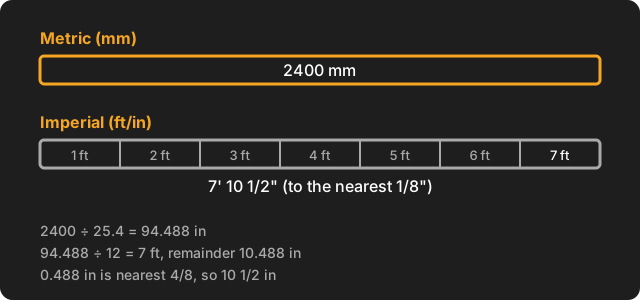
Divide the millimetres by 25.4. One inch is exactly 2.54 cm, which is 25.4 mm, so the conversion has no rounding in it (NIST Guide to the SI, Appendix B.8, inch to centimetre; checked on 28 October 2026). Divide the inches by 12 to get feet. Round the leftover fraction of an inch to the nearest sixteenth, or whatever your tape reads. For 1575 mm: 1575 ÷ 25.4 = 62.008 in, which is 5 feet and 2.008 in; 0.008 × 16 = 0.13, which rounds to 0, so 5' 2".
| Millimetres | Inches (decimal) | Feet and inches (to 1/16") |
|---|---|---|
| 90 mm (a common frame width) | 3.543 | 3 9/16" |
| 100 mm | 3.937 | 3 15/16" |
| 150 mm | 5.906 | 5 7/8" |
| 450 mm (a stud spacing) | 17.717 | 1' 5 11/16" |
| 600 mm | 23.622 | 1' 11 5/8" |
| 1200 mm (a sheet width) | 47.244 | 3' 11 1/4" |
| 2400 mm (a sheet length) | 94.488 | 7' 10 1/2" |
For a longer list and the reverse direction, see mm to feet and inches.
What do the same jobs look like in each mode?
The sums are identical. Only the way the numbers are written changes.
Squaring a frame
In Check Square, a 3600 × 2400 mm frame has a target diagonal of √(3600² + 2400²) = √18720000 = 4326.7 mm. Switch to imperial and the same job reads 11' 9 23/32" × 7' 10 1/2" with a target diagonal of 14' 2 11/32" (at 1/32 precision; for the length, 3600 ÷ 25.4 = 141.732 in, which is 11' 9.732", and 0.732 × 32 = 23.4, so 23/32). The method is the same either way, as set out in how to check if a frame is square.
Setting out stairs
In Stairs, a total rise of 2700 mm and a going of 240 mm gives 15 rises of 180.0 mm each. The app aims for 2 × riser + going = 600, so the target riser is (600 − 240) ÷ 2 = 180 mm, 2700 ÷ 180 = 15 rises, and 2700 ÷ 15 = 180.0 mm. In imperial mode the 2700 mm rise reads 8' 10 5/16" and each riser reads 7 1/16" (at 1/16 precision: 180 ÷ 25.4 = 7.087 in, and 0.087 × 16 = 1.4, so 1/16). If you work from a drawing in millimetres and a tape in inches, you can enter whichever you have in front of you. See how many steps for a floor height.
Ordering concrete
In Concrete, a 4000 × 3000 mm slab, 100 mm deep, is 4 × 3 × 0.1 = 1.200 m³ (1200.0 L), and 1.2 × 1.10 = 1.320 m³ with 10% extra. In imperial mode you enter it as 13' 1 1/2" × 9' 10 1/8" × 3 15/16" (each rounded to 1/16"), and the answer is still in cubic metres, which is how concrete is ordered here. See how much concrete you need.
Can it add feet, inches and fractions like a tape-measure calculator?
No. MeisterCalc is a set of trade calculators, not a feet-inch-fraction keypad. It can show a result in feet, inches and sixteenths, but it can't add 5' 3 1/2" and 2' 7 3/4" the way a keypad calculator does. If that is your main need, read Alternatives to a feet-and-inches keypad calculator, which compares the options with sources and a checked date, or the best construction calculator apps for Android.
Does it work offline?
Yes. Every calculation runs on your phone. The app uses the network only for purchases, product analytics and crash reports.
Is there an iPhone version?
Not yet. MeisterCalc is Android only, on Android 7.0 or later, and the interface is in English. There is an iOS waitlist.
Does using it make my work comply with the building code?
No. MeisterCalc does the arithmetic. The rules for your job come from the National Construction Code, the NZ Building Code and Approved Documents, or UK Building Regulations, and from your local council or building certifier. Check the requirement before you build.
Try it
Concrete, Stairs and Check Square are free. The other 12 calculators unlock with a weekly subscription that starts with a 3-day free trial, or with a one-time lifetime unlock. The unit setting is in Settings, a tap from the home screen, so you can see both modes in a minute.