Is there a free concrete calculator app for slabs and post holes?
Published · Updated · By Sai Nath
Yes. MeisterCalc's Concrete calculator is one of three free calculators in the app, on Android only. It works out a slab from length, width and depth, or post holes from diameter, depth and number of holes. Results are in cubic metres (litres for slabs), with 10 percent added to order. It works offline.
What can the Concrete calculator work out?
It has two modes, chosen at the top of Home ▸ Concrete: Slab and Holes. The app remembers the last one you used.
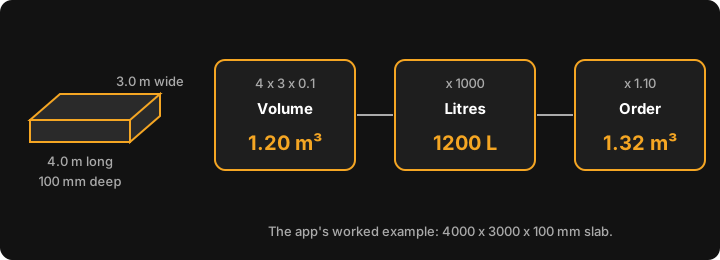
Slab. Enter Length, Width and Depth. Volume is length × width × depth, in metres. For a slab 4000 × 3000 × 100 mm that is 4 × 3 × 0.1 = 1.20 m³, or 1200 litres. The Order (+10%) line shows 1.32 m³.
Holes. Enter Diameter, Depth and Number of Holes. Each hole is pi × (diameter ÷ 2)² × depth. For 300 mm across, 800 mm deep and six holes, one hole is 0.0565 m³, the total is 0.3393 m³ and the order figure is 0.3732 m³. You enter the diameter, not the radius. The sum is explained step by step in how much concrete for a post hole.
Both modes draw a live diagram that changes as you type, and the ⓘ buttons open short in-app help for each input and result. For slabs and other shapes by hand, see how much concrete do I need.
Why does the order figure add 10 percent?
Spillage, uneven ground and slightly over-dug holes all use more than the sum says, so the order line is the volume × 1.10. That 10 percent is fixed. For how much extra people order and why, see how much extra concrete to order.
Can it work out a cost?
Optionally. Enter a Price per m³ under the optional Cost heading (the currency symbol is set in Settings) and a Wastage slider appears, from 0 to 30 percent and starting at 10. The card then shows Total Cost and Cost plus the wastage. With an example price of 200 per m³ on the 1.200 m³ slab, Total Cost is 1.2 × 200 = 240, and at 10 percent wastage Cost + 10% Waste is 1.2 × 1.10 × 200 = 264. The slider changes the cost only. The Order (+10%) line stays at 10 percent.
Does it work offline, and in metric or imperial?
Every calculation runs on the phone, so no signal is needed on site. The app uses the internet for purchases, product analytics and crash reports, not for the sums. It is metric first, in millimetres. Switch to feet and inches under Settings ▸ Units ▸ Default units. Results stay in cubic metres either way.
Can I share the result?
Yes. Tap Share results, then Share as Text or Share as PDF. The share lists your inputs (Length, Width and Depth, or Diameter, Depth and Count) and the results, so a supplier or a mate sees what you entered.
What doesn't it do?
- No bag counts. Divide by the yield printed on the bag; see how many bags of concrete make a cubic metre.
- No weight. For tonnes, see cubic metres to tonnes.
- No mix ratios, strength grades, steel or mesh, and no formwork.
- No steps, strip footings, columns or belled and tapered holes. Holes are straight cylinders, so split a belled hole into groups.
- No litres line in Holes mode, and no gravel base. Gravel is a separate calculator.
- It does not know your soil, your design or your council's rules.
It gives a volume, not a specification. Slab thickness and footing sizes come from the design, the plans and your local council.
Is there an iPhone version?
Not yet. MeisterCalc is Android only, on Android 7.0 or later, and the interface is in English. You can join the iOS waitlist.
What else is free?
Concrete, Stairs and Check Square are the free calculators. The other twelve unlock with a weekly subscription that starts with a 3-day free trial, or with a one-time lifetime unlock; Google Play shows the prices in your currency. To see how it sits next to other options, read the best construction calculator apps for Android. If you only want a quick volume in cubic metres, there is a concrete calculator in cubic metres.