Is there a framing calculator app for studs, layout marks and raked walls?
Published · Updated · By Sai Nath
Yes, on Android. MeisterCalc counts the studs in a wall, gives you the layout marks to read off one tape, and works out raked walls with a stud cut list. It is metric first, with feet and inches in Settings. It does not do roof framing, openings or noggings, and only three of its calculators are free.
What does MeisterCalc do for wall framing?
Five of its 15 calculators help with a wall. Each has a live diagram and works offline. The worked examples below come from the app's own formulas.
| Calculator | You enter | Example | Free? |
|---|---|---|---|
| Stud Counter | Wall length, spacing, stud height | 3600 mm at 450 mm, 2400 mm studs: 9 studs, 21.6 lineal metres | Paid |
| Running Measurements | Start, Interval | Start 38, Interval 450: 38 + 450 = 488, 38 + 900 = 938, 38 + 1350 = 1388 mm | Paid |
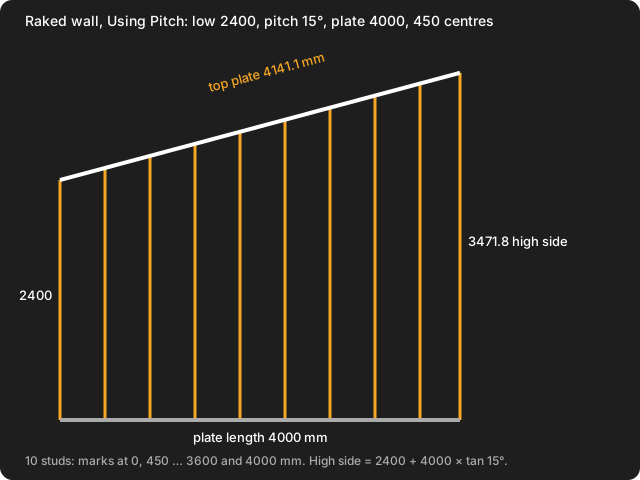
| Raked Walls | Low Side Height, Pitch or High Side Height, Plate Length, Bottom Plate and Top Plate thicknesses, Stud Spacing | 2400 low, 15°, 4000 plate: high side 2400 + 4000 × tan 15° = 3471.8 mm, top plate 4000 ÷ cos 15° = 4141.1 mm | Paid |
| Equal Spacings | Overall length, target spacing | 5500 mm at 450 mm: 5500 ÷ 450 = 12.22, so 12 spaces of 5500 ÷ 12 = 458.3 mm | Paid |
| Triangles | Any two sides or a side and an angle | Base 3500, rise 1400: hypotenuse √(3500² + 1400²) = √14210000 = 3769.6 mm | Paid |
How do I work out how many studs a wall needs?
Divide the wall length by the spacing, round up, and add one. A 3600 mm wall at 450 mm centres is 8 spaces, so 9 studs. Stud Counter does that sum and multiplies by your stud height for the lineal metres: 9 × 2400 = 21600 mm, or 21.6 m. It counts the run of studs only. How many studs do I need walks through it, and the wall framing calculations guide covers the parts you count from the plans.
Can it give me layout marks?
Yes. Running Measurements turns a Start and an Interval into a table of marks, so you hook the tape once and read every mark off it. The first stud sits at the Start and is not in the table. The Speak button on the RUNNING TABLE header reads the marks aloud through your phone's text-to-speech. The method is in how to mark out studs. If the wall does not divide evenly and you want equal gaps, Equal Spacings gives the whole number of spaces: see how to divide a length into equal spaces.
Can it do a raked wall?
Yes. Raked Walls has two modes: Mode A — Pitch, and Mode B — Two Heights. It gives the high side height, the top plate length, and a cut list of studs from tallest to shortest, with the bottom and top mark for each. The picture below is the 2400 mm, 15°, 4000 mm example drawn to scale. See how to frame a raked wall for the steps.
What doesn't it do?
- No openings: doors, windows, jambs or lintels.
- No corners or T-junction studs, no noggings, no plates count, no bracing.
- No roof framing: no rafters, hips, valleys or birdsmouths. Apps built for roof framing exist if you need those.
- No feet-and-inch arithmetic. Imperial display is in Settings ▸ Units ▸ Default units ▸ Imperial (ft/in), but the calculators work on lengths you enter.
- The interface is English only.
It also does not set the spacing. That comes from your plans, the NCC, the NZ Building Code and Approved Documents, or your council. See the guides for Australia, New Zealand and the UK.
Is there a free framing calculator app?
Not for framing, in MeisterCalc. The free calculators are Concrete, Stairs and Check Square. The five above unlock with a weekly subscription that starts with a 3-day free trial, or with a one-time lifetime unlock. Google Play shows the prices in your currency. Calculations run offline; the app uses the network only for purchases, analytics and crash reports. For how other Android apps compare, see the roundup of construction calculator apps for Android.
Which phones does it run on?
Android only, version 7.0 or later. There is no iPhone version yet; you can join the iOS waitlist.