Is there a gravel, soil and asphalt calculator app that gives tonnes?
Published · Updated · By Sai Nath
Yes. MeisterCalc, on Android, has separate Gravel, Soil and Asphalt calculators. Enter length, width, depth and a density in kg/m³ and it gives volume in cubic metres, weight in tonnes and an order figure with 10 percent added. The density starts at a default you can change to your supplier's figure. It works offline.
How does the Gravel calculator get tonnes?
Open Home ▸ Gravel. Volume is length × width × depth, in metres. Weight in tonnes is that volume × density ÷ 1000. The Order (+10%) row is the weight × 1.10.
A worked example: a bed 10 m long, 3 m wide and 75 mm deep, with density 1500 kg/m³.
- Volume: 10 × 3 × 0.075 = 2.250 m³.
- Weight: 2.25 × 1500 ÷ 1000 = 3.375 t.
- Order: 3.375 × 1.10 = 3.7125, shown as 3.713 t.
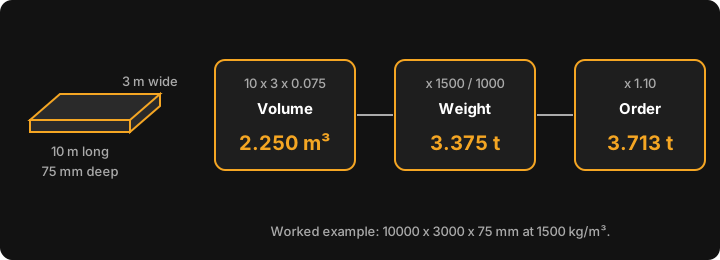
You type length, width and depth in millimetres. If you've set Settings ▸ Units ▸ Default units to Imperial (ft/in), you enter feet and inches instead; the results stay in cubic metres and tonnes. A live diagram changes as you type, and the ⓘ buttons open short in-app help for Volume, Weight and Order. For the same sum by hand, see how much gravel do I need.
Does it do soil and asphalt too?
Yes. Home ▸ Soil and Home ▸ Asphalt are the same calculator with a different starting density, so the sum above applies to all three. The app starts at these densities. They are app defaults, not standards:
| Calculator | Starting density | 10 × 3 × 0.075 m: weight | Order (+10%) |
|---|---|---|---|
| Gravel | 1500 kg/m³ | 3.375 t | 3.713 t |
| Soil | 1200 kg/m³ | 2.700 t | 2.970 t |
| Asphalt | 2400 kg/m³ | 5.400 t | 5.940 t |
The same 2.25 m³ weighs very differently by material, which is why a cubic metre figure alone can't be ordered by the tonne. The other pages cover each job: how much soil, how much asphalt and how much road base. For a road base or sand job, use the Gravel calculator and change the density; there are no presets.
Can I change the density?
Yes, and you should. Density is an editable field on all three calculators, accepted from 100 to 5000 kg/m³ (outside that range the calculator gives no result). The app remembers your last entries on each calculator.
There is no single density for gravel, soil or asphalt. It moves with the material, its moisture and how well it's compacted, so use the figure on your supplier's quote or delivery docket and the tonnes will match what they sell. The conversion is explained in cubic metres to tonnes for gravel, soil and sand.
What does the Order (+10%) row add?
It adds a fixed 10 percent to the weight, a margin for spillage, uneven ground and a base that ends up a little deeper than planned. The 10 percent can't be changed. If you want a different margin, take the Weight row and add your own.
Can it work out a cost?
Optionally. Type a Price per tonne (the currency symbol comes from Settings) and a Wastage slider appears, from 0 to 30 percent, starting at 10. The card then adds Total Cost (weight × price) and Cost + N% Waste (weight × (1 + N%) × price). With an example price of 60 per tonne, 3.375 t is 202.50, and with 10 percent waste it is 222.75. The slider changes the cost only; the Order (+10%) row stays at 10 percent.
It doesn't round up to whole truckloads and it doesn't add delivery charges, so check both with your supplier.
Can I share the result?
Yes. Tap Share results, then Share as Text or Share as PDF. The share lists your inputs (length, width, depth and density) and the results, so a supplier sees exactly what you entered.
What doesn't it do?
- No compaction or moisture factor. If the material compacts, allow for it in the density or the depth.
- No material presets: no road base, sand or crushed rock lists. Edit the density instead.
- One rectangular area at a time. For an irregular shape, split it into rectangles and add the tonnes.
- No truckload rounding, bag counts or delivery pricing. For bulk bags, see how many bulk bags of gravel.
- It does not know your site, your base specification or your council's rules. Depths come from the plans and the supplier.
Is it free, offline, and on iPhone?
Gravel, Soil and Asphalt aren't among the three free calculators (Concrete, Stairs and Check Square are). The other twelve unlock with a weekly subscription that starts with a 3-day free trial, or with a one-time lifetime unlock; Google Play shows the prices in your currency.
Every calculation runs on the phone, so no signal is needed on site. The app uses the internet for purchases, product analytics and crash reports, not for the sums. It is Android only, on Android 7.0 or later, and the interface is in English. There is no iPhone version yet; you can join the iOS waitlist.
To see how it sits next to other options, read the best construction calculator apps for Android. For a free calculator that does slabs and post holes, there is the Concrete calculator.