What does a right angle triangle calculator in mm solve?
Published · Updated · By Sai Nath
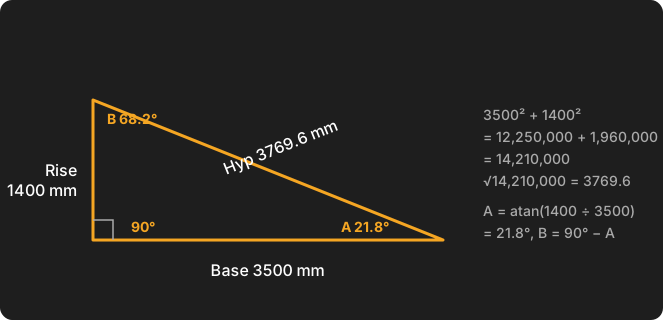
A right angle triangle calculator takes any two known values (two sides, or a side and an angle) and works out the rest. In MeisterCalc, a 3500 mm base and 1400 mm rise give a 3769.6 mm hypotenuse and angles of 21.8° and 68.2°. Results show in mm, or feet, inches and fractions.
What do I enter, and what comes back?
You enter two values. You pick which two from a row of nine chips at the top of the screen, and the result updates as you type. The calculator names the sides the way a chippy would: Base is the horizontal leg, Rise is the vertical leg, and Hyp is the sloping side opposite the right angle. Angle A is the corner between Base and Hyp. Angle B is the top corner between Rise and Hyp. The two always add up to 90°.
The result card shows Base, Rise, Hyp, Angle A and Angle B, whichever pair you started from. Lengths are shown to 0.1 mm and angles to three decimals, for example 3769.6 mm and 21.801°.
How do I find the hypotenuse?
Choose Base + Rise and type both lengths. The hypotenuse is √(base² + rise²), which is the Pythagorean theorem. With a base of 3500 mm and a rise of 1400 mm:
- 3500² + 1400² = 12,250,000 + 1,960,000 = 14,210,000.
- √14,210,000 = 3769.6 mm.
- Angle A = atan(1400 ÷ 3500) = 21.8°, so angle B = 90° − 21.8° = 68.2°.
An easy one to test any calculator with is 3000 and 4000, which gives exactly 5000 (a 3-4-5 triangle scaled up; see the 3-4-5 rule). If the idea of squaring and adding is new, Pythagoras in construction walks through it on other site jobs.
The nine pairs: what do I know, what do I get?
Pick the chip that matches what you have measured. The formulas are the standard right-triangle relationships: sine is opposite over hypotenuse, cosine is adjacent over hypotenuse, tangent is opposite over adjacent.
| Chip | You know | It works out |
|---|---|---|
| Base + Rise | both legs | Hyp = √(base² + rise²); A = atan(rise ÷ base) |
| Base + Hyp | one leg and the hypotenuse | Rise = √(hyp² − base²); A = acos(base ÷ hyp) |
| Rise + Hyp | the other leg and the hypotenuse | Base = √(hyp² − rise²); B = asin(rise ÷ hyp) |
| Base + ∠A | base and angle A | Rise = base × tan A; Hyp = base ÷ cos A |
| Base + ∠B | base and angle B | Rise = base ÷ tan B; Hyp = base ÷ sin B |
| Rise + ∠A | rise and angle A | Base = rise ÷ tan A; Hyp = rise ÷ sin A |
| Rise + ∠B | rise and angle B | Base = rise × tan B; Hyp = rise ÷ cos B |
| Hyp + ∠A | hypotenuse and angle A | Base = hyp × cos A; Rise = hyp × sin A |
| Hyp + ∠B | hypotenuse and angle B | Rise = hyp × cos B; Base = hyp × sin B |
In every row the other angle is 90° minus the one you have. Lengths must be above zero and angles must be between 0° and 90° (not 0, not 90); otherwise the field shows an error message. The hypotenuse must also be longer than either leg, or no result appears.
How do I calculate triangle sides with angles?
Use one side and one angle. Two examples, both worked in mm:
- Base + ∠A: base 3000 mm, angle A 30°. Rise = 3000 × tan 30° = 1732.1 mm. Hyp = 3000 ÷ cos 30° = 3464.1 mm. Angle B is 60°.
- Hyp + ∠A: hypotenuse 2400 mm, angle A 35°. Base = 2400 × cos 35° = 1966.0 mm. Rise = 2400 × sin 35° = 1376.6 mm. Angle B is 55°.
The other chips work the same way. One example each:
| Chip | You enter | Working and result |
|---|---|---|
| Base + Hyp | base 3000 mm, hyp 5000 mm | Rise = √(5000² − 3000²) = √16,000,000 = 4000 mm. A = acos(3000 ÷ 5000) = 53.13°, B = 36.87° |
| Rise + Hyp | rise 1200 mm, hyp 2000 mm | Base = √(2000² − 1200²) = √2,560,000 = 1600 mm. B = asin(1200 ÷ 2000) = 36.87°, A = 53.13° |
| Base + ∠B | base 1500 mm, B 60° | Rise = 1500 ÷ tan 60° = 866.0 mm. Hyp = 1500 ÷ sin 60° = 1732.1 mm. A = 30° |
| Rise + ∠A | rise 1000 mm, A 40° | Base = 1000 ÷ tan 40° = 1191.8 mm. Hyp = 1000 ÷ sin 40° = 1555.7 mm. B = 50° |
| Rise + ∠B | rise 1000 mm, B 50° | Base = 1000 × tan 50° = 1191.8 mm. Hyp = 1000 ÷ cos 50° = 1555.7 mm. A = 40° |
| Hyp + ∠B | hyp 2400 mm, B 35° | Rise = 2400 × cos 35° = 1966.0 mm. Base = 2400 × sin 35° = 1376.6 mm. A = 55° |
Enter angles as decimal degrees (35, or 22.5). Degrees-minutes-seconds and radians are not accepted.
What about a right triangle with two equal sides?
That is a 45-45-90 triangle. Choose Base + Rise and enter the same number for both, or choose Base + ∠A and enter 45. The hypotenuse is the side × √2, about 1.4142. A side of 1000 mm gives 1414.2 mm. It is the same shape as a square cut corner to corner, which is why a 45° knee brace and a rectangle's diagonal use the same sum.
Does it work in feet and inches?
Yes. The calculator stores everything in millimetres and changes only what it shows. Go to Settings ▸ Units ▸ Default units ▸ Imperial (ft/in). Lengths are then entered and shown as feet, inches and fractions. A Fraction precision setting appears (1/8, 1/16 or 1/32 of an inch) once imperial is on. Angles stay in degrees. Switching units clears the entries, so switch first, then type. The app remembers your last chip and values between visits.
How does this help on a real job?
Anywhere a sloping member sits between a horizontal and a vertical measurement: a brace, a stringer, a ramp, a rafter length, or a diagonal across a frame. The in-app help notes that angle B is often the plumb-cut angle at a rafter end. For a roof, the pitch itself is a different question, covered in how to calculate roof pitch. To check a frame is square, measure both diagonals as in how to check if a frame is square.
What doesn't it do?
- No area or perimeter. For area, the plain rule is base × rise ÷ 2: 3500 × 1400 ÷ 2 = 2,450,000 mm², or 2.45 m². That is arithmetic, not something the app calculates.
- No triangles without a right angle.
- No entry of all three sides. It needs exactly two values, and works out the third side itself.
- No sin, cos or tan buttons, and no rafter, hip or valley cuts.
For a rectangle's diagonal, the free Check Square calculator is the more direct tool.
Formulas checked against Wikipedia's pages on the Pythagorean theorem and right triangles on 28 October 2026.
Try it
Triangles is one of MeisterCalc's 15 calculators. It is not one of the three free ones (Concrete, Stairs and Check Square): it unlocks with a weekly subscription that starts with a 3-day free trial, or with a one-time lifetime unlock, and Google Play shows the prices in your currency. It works offline, on Android 7.0 or later. There is no iPhone version yet; you can join the iOS waitlist.